User manual Denon DJ MC6000MK2 Professional Digital Mixer and MC6000MK2
Operating instructions and pdf manual for use - Denon DJ MC6000MK2 Professional Digital Mixer and MC6000MK2 User manual, User manual Denon DJ MC6000MK2 Professional Digital Mixer and MC6000MK2, Denon, DJ, MC6000MK2, Professional, Digital, Mixer, MC
User manual for Denon DJ MC6000MK2 Professional Digital Mixer and MC6000MK2
Overall Rating: 3.5
70% of respondents would recommend this to a friend.
Manufacturer: Denon DJ
Basic description and contents of package
Product classification: Pro Audio - DJ Equipment - DJ Controllers
Safety instructions
Startup and operation of the dj controllers
Tips for setting up your Denon DJ
Settings and expert assistance
Contact Denon DJ service
Troubleshooting
Warranty information
We recommend checking out our discussion threads on the Denon DJ MC6000MK2 Professional Digital Mixer and MC6000MK2,
which address similar problems with connecting and setting up DJ Controllers Denon DJ.
User manual for the Denon DJ MC6000MK2 Professional Digital Mixer and MC6000MK2
The user manual for the Denon DJ MC6000MK2 Professional Digital Mixer and MC6000MK2 provides
necessary instructions for the proper use of the product Pro Audio - DJ Equipment - DJ Controllers.
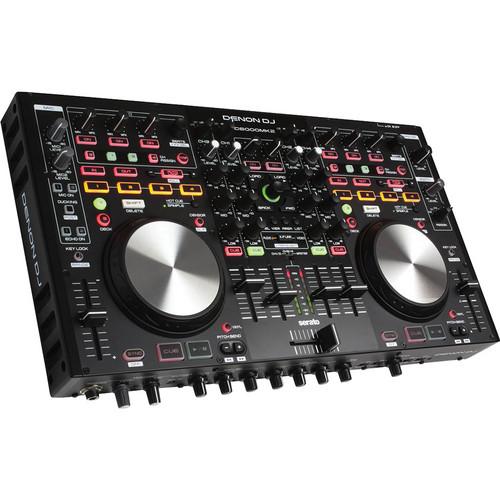
The Denon DJ MC6000MK2 Professional Digital Mixer and Controller is designed for mobile DJs and live performance applications. The controller is housed in a stainless steel chassis and features a built-in 24-bit audio interface, a 4 channel/8 source real-time matrix, and is designed for use with Serato. The controller comes with a copy of Serato Intro, which can be upgraded to the full version of the program, Serato DJ. It is fully MIDI compliant and compatible with other DJ programs such as Virtual DJ, MixVibes Cross, and Native Instruments Traktor by using MIDI mappings. The controller comes with a voucher for a full version of Serato DJ with product registration and also supports Serato's DVS expansion pack which allows you to send Serato NoiseMap signals using the controller's interface.
For performance, the controller features two built-in decks, 4+4 hot cue/sampler buttons with bank selector key, auto/manual looping, pitch bend controls, and the option of connecting turntables, CDJs, or auxiliary inputs for 4-deck operation as a mixer. Additional routing is possible through the USB audio input. The top panel of the unit features transport, EQ, pitch, loop, hot-cue/sample, navigation, and FX controls. You can also use the controller as a video mixer, by utilizing the optional Serato Video plug-in to program, mix, scratch, and add transition FX to videos.
The mixer's controls are designed for Serato's interface, enabling functions such as roll, sensor, and slip as well as view preferences such as panel, view, area, and list. Four independent deck layer keys enable fast selection of tracks. To record, the unit features a line 3/4 thru to PC mode for connecting to a Mac or PC.
The unit includes a beat parameter knob for controlling beat attributes, FX tap buttons for setting the BPM, FX mode change control, and 8 assign keys for effect control. For vocals, the unit offers dual balanced microphone inputs with independent EQ and echo FX controls. The controller features balanced 1/4" booth, balanced XLR main, and unbalanced RCA main outputs. Optional accessories such as a 19" rackmount kit and nylon flight case are available (sold separately).
If you own a Denon DJ dj controllers and have a user manual in electronic form,
you can upload it to this website using the link on the right side of the screen.
You can upload and download the manual for the Denon DJ MC6000MK2 Professional Digital Mixer and MC6000MK2 in the following formats:
*.pdf, *.doc, *.txt, *.jpg - Other formats are unfortunately not supported.
Additional parameters of the Denon DJ MC6000MK2 Professional Digital Mixer and MC6000MK2:
The user manual for the Denon DJ MC6000MK2 Professional Digital Mixer and MC6000MK2 can be downloaded in .pdf
format if it did not come with your new dj controllers, although the seller is
required to supply one. It is also quite common that customers throw out
the user manual with the box, or put the CD away somewhere and then can’t find it.
That’s why we and other Denon DJ users keep a unique electronic library
for Denon DJ dj controllerss,
where you can use our link to download the user manual for the Denon DJ MC6000MK2 Professional Digital Mixer and MC6000MK2.
The user manual lists all of the functions of the Denon DJ MC6000MK2 Professional Digital Mixer and MC6000MK2,
all the basic and advanced features and tells you how to use the dj controllers.
The manual also provides troubleshooting for common problems. Even greater
detail is provided by the service manual, which is not typically shipped with the product,
but which can often be downloaded from Denon DJ service.
If you want to help expand our database, you can upload a link to this website
to download a user manual or service manual, ideally in .pdf format. These pages
are created by you – users of the Denon DJ MC6000MK2 Professional Digital Mixer and MC6000MK2. User manuals are also
available on the Denon DJ website under Pro Audio - DJ Equipment - DJ Controllers.
Question and answer discussion forum concerning user instructions and resolving problems with the Denon DJ MC6000MK2 Professional Digital Mixer and MC6000MK2 - no comments have been made yet - be the first to add a comment


 Question and answer discussion forum concerning user instructions and resolving problems with the Denon DJ MC6000MK2 Professional Digital Mixer and MC6000MK2 - no comments have been made yet - be the first to add a comment