|
User manual for Smart-AVI MXCore-UH Expandable HDMI Video Router MXC-UH16X32S
- Manufacturer: Smart-AVI
- Basic description and contents of package
- Product classification: Professional Video - Signal Processing & Distribution - Video Extenders & Repeaters
- Safety instructions
- Startup and operation of the video extenders & repeaters
- Tips for setting up your Smart-AVI
- Settings and expert assistance
- Contact Smart-AVI service
- Troubleshooting
- Warranty information
- Price: 20 USD
|
We recommend checking out our discussion threads on the Smart-AVI MXCore-UH Expandable HDMI Video Router MXC-UH16X32S,
which address similar problems with connecting and setting up Video Extenders & Repeaters Smart-AVI.
|
User manual for the Smart-AVI MXCore-UH Expandable HDMI Video Router MXC-UH16X32S
The user manual for the Smart-AVI MXCore-UH Expandable HDMI Video Router MXC-UH16X32S provides
necessary instructions for the proper use of the product Professional Video - Signal Processing & Distribution - Video Extenders & Repeaters.
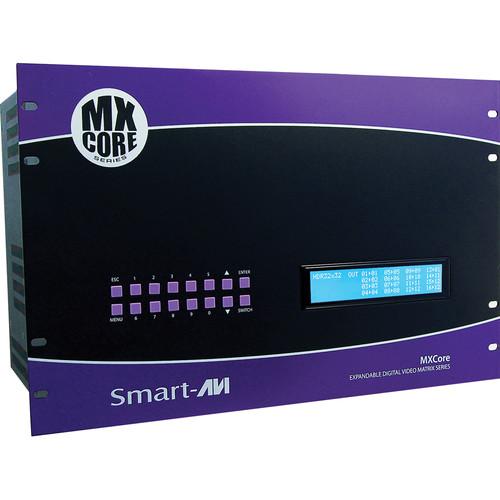
The 16x32 MXCore-UH Expandable HDMI Video Router over Cat5e/6 Matrix from Smart-AVI is an HDMI video router that features HDBaseT technology, which enables you to route 1080p HD video, multi-channel audio, Ethernet, IR, and power signals up to 425' away over a single CAT 5e/6 cable. This unit includes 4 input cards, and 8 output cards. Each card features 4 inputs/outputs respectively for a total matrix of 16 HDMI inputs to 32 RJ45 outputs. In order to convert the signals back to HDMI, an HDX-MX receiver is required (not included).
You can locally switch between sources via the front panel controls, or remotely via the RS-232, IR, or TCP/IP connections. The MXCore-UH can be controlled by Smart-AVI's Windows-based manager software. The front-panel LCD display and keypad allow you to determine which inputs are routed to which outputs. The RS-232 allows you to assign a unique name to each port on the Matrix along with a display for specific project requirements. The IR control interface allows you greater flexibility when managing the MXCore-UH from a distance. This can be used when the displays are not visible from the Matrix, which would require control via Infrared command signals.
The MXCore-UH features 16 inputs, each incorporating the SmartEDID programmable technology capable of learning video resolutions, audio settings and 3D data. The EDID memory of each display is stored in a single flash memory, designed to give you freedom to choose any EDID and emulation of any display. The MXCore-UH enables HDMI sources to continuously read the EDID of a monitor with full emulation at any given time. The EDID management allows learning and saving of up to 100 displays, including audio. The MXCore-UH can learn EDID from any display device provided.
SmartConrol is the Windows GUI application that enables users to control SmartAVI Matrix using graphic user interface without having to write the codes and send serial commands to the devices. The software allows configuration of the size and type of the Matrix, including a preset defined at macro. The software also enables identification by name for each source and display. The Net-IP-Pro gives the user full control of the Matrix from anywhere in the world through this web browser software. The Net-IP-Pro enables multiple users to control and configure the Matrix, including names of sources, names of displays, IP addresses and low level features of the Matrix. This Google based software enables the support of telnet for easy integration with other control systems.
|
If you own a Smart-AVI video extenders & repeaters and have a user manual in electronic form,
you can upload it to this website using the link on the right side of the screen.
You can upload and download the manual for the Smart-AVI MXCore-UH Expandable HDMI Video Router MXC-UH16X32S in the following formats:
- *.pdf, *.doc, *.txt, *.jpg - Other formats are unfortunately not supported.
|
Additional parameters of the Smart-AVI MXCore-UH Expandable HDMI Video Router MXC-UH16X32S:
| Format | HDMI 1.3 and HDCP compliant | | Resolutions | HDTV: 480p, 720p, 1080i, 1080p/60 Hz/48-bit
TV: 480i | | IR Signal | 38 kHz | | Connectors | Front Panel:
1 x 3.5 mm phone jack, IR interface Rear Panel:
1 x 19-pin type A TMDS female, DVI-D input
1 x 19-pin type A TMDS female, DVI-D output
1 x 9-pin Sub-D, RS-232
16 x HDMI input
32 x RJ45 output
1 x 3-pin IEC, power input | | Controls | 1 x Esc push-button
1 x Menu push-button
1 x Enter push-button
1 x Switch push-button
1 x Up push-button
1 x Down push-button
10 x Input select push-button
1 x 4x40 LCD display
Rear Panel:
1 x Power On/Off switch | | Approvals | UL, CE, ROHS compliant | | Operating Temperature | 32 to 131°F (0 to 55°C) | | Storage Temperature | -4 to 185°F (-20 to 85°C) | | Humidity | Up to 95% | | Power Supply | 100-240 VAC/5 VDC, 2 A @ 10 W | | Dimensions (W x H x D) | 5.0 x 1.1 x 4.1" (12.7 x 2.9 x 10.5 cm) | | Cable Length | Up to 40' (12.2 m) | | Weight | 20.0 lb (9.1 kg) | | Video Amplifier Bandwidth | 3.2 G | | Input Video Signal | 0.5 - 1.0 V pp (TMDS) | | Input DDC Signal | 5 V | | Supported Signals | HDMI and HDCP compliant | | Pixel Clock Frequency | >165 Mpix/sec | | Format | 4:4:4 and 4:2:2 data input formats | | Resolution | 480p, 720p, 1080i, and 1080p | | Input Card Slots | Each Card: 4 x HDMI | | Output Card Slots | Each Card: 4 x RJ45 (CAT5e/6) | | Supported Video Types | RGB/YCBCR: 24/30/36-bits
YCBCR: 8/10/12/16/20/24-bits | | IR | 38 kHz, RC5 | | RS-232 | 9600 b/s, software flow | | TCP/IP | Webserver, Telnet | | Operating Temperature | 32 to 131°F (0 to 55°C) | | Storage Humidity | 10 - 90% | | Power Supply | 100 - 230 VAC, 50/60 Hz | | Power Consumption | 300 W | | Dimensions (W x H x D) | 17.1 x 12.0 x 12.0" (43.5 x 30.5 x 30.5 cm) | | Weight | 0.6 lb (0.3 kg) | |
The user manual for the Smart-AVI MXCore-UH Expandable HDMI Video Router MXC-UH16X32S can be downloaded in .pdf
format if it did not come with your new video extenders & repeaters, although the seller is
required to supply one. It is also quite common that customers throw out
the user manual with the box, or put the CD away somewhere and then can’t find it.
That’s why we and other Smart-AVI users keep a unique electronic library
for Smart-AVI video extenders & repeaterss,
where you can use our link to download the user manual for the Smart-AVI MXCore-UH Expandable HDMI Video Router MXC-UH16X32S.
The user manual lists all of the functions of the Smart-AVI MXCore-UH Expandable HDMI Video Router MXC-UH16X32S,
all the basic and advanced features and tells you how to use the video extenders & repeaters.
The manual also provides troubleshooting for common problems. Even greater
detail is provided by the service manual, which is not typically shipped with the product,
but which can often be downloaded from Smart-AVI service.
If you want to help expand our database, you can upload a link to this website
to download a user manual or service manual, ideally in .pdf format. These pages
are created by you – users of the Smart-AVI MXCore-UH Expandable HDMI Video Router MXC-UH16X32S. User manuals are also
available on the Smart-AVI website under Professional Video - Signal Processing & Distribution - Video Extenders & Repeaters.
 Question and answer discussion forum concerning user instructions and resolving problems with the Smart-AVI MXCore-UH Expandable HDMI Video Router MXC-UH16X32S - no comments have been made yet - be the first to add a comment
Post new comment/question/response regarding the Smart-AVI MXCore-UH Expandable HDMI Video Router MXC-UH16X32S
|
|
|
|
|
