User manual Acebil J-805GX Prosumer Tripod System J-805GX
Operating instructions and pdf manual for use - Acebil J-805GX Prosumer Tripod System J-805GX User manual, User manual Acebil J-805GX Prosumer Tripod System J-805GX, Acebil, J-805GX, Prosumer, Tripod, System, J-805GX, Video
User manual for Acebil J-805GX Prosumer Tripod System J-805GX
Manufacturer: Acebil
Basic description and contents of package
Product classification: Professional Video - Tripods, Supports & Rigs - Tripods & Accessories - Tripod Systems
Safety instructions
Startup and operation of the tripod systems
Tips for setting up your Acebil
Settings and expert assistance
Contact Acebil service
Troubleshooting
Warranty information
Price: 285 USD
We recommend checking out our discussion threads on the Acebil J-805GX Prosumer Tripod System J-805GX,
which address similar problems with connecting and setting up Tripod Systems Acebil.
User manual for the Acebil J-805GX Prosumer Tripod System J-805GX
The user manual for the Acebil J-805GX Prosumer Tripod System J-805GX provides
necessary instructions for the proper use of the product Professional Video - Tripods, Supports & Rigs - Tripods & Accessories - Tripod Systems.
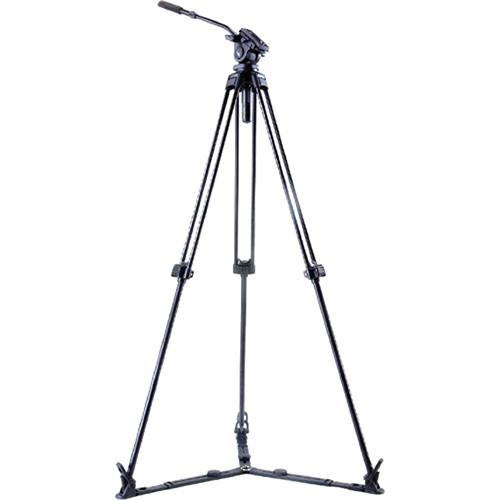
The Acebil J-805GX Prosumer Tripod System includes a single stage, lightweight (9.1 lb / 4.12kg) aluminum tripod, the 805 fluid head, a ground spreader, and the s-30 carry case. Capable of supporting up to 8.8 lb (4kg), the J-805GX provides an optimum solution for small and high performance MiniHD camcorders.
The aluminum tripod can be adjusted to a height ranging from 34.2“ to 59” (86.8 - 149.8 cm), and the ground spreader holds the legs in two positions (45° and 90°) and provides augmented stability and rigidity. You can achieve fixed counter balance and drag by means of the included 805 standard head. A convenient standard leveling base with 75mm ball diameter is provided allowing tilt angles of +90° / -60°.
Camera mounting is provided via a quick release slide plate. You can use the s-30 soft carry case for storing the J-805GX tripod system.
If you own a Acebil tripod systems and have a user manual in electronic form,
you can upload it to this website using the link on the right side of the screen.
You can upload and download the manual for the Acebil J-805GX Prosumer Tripod System J-805GX in the following formats:
*.pdf, *.doc, *.txt, *.jpg - Other formats are unfortunately not supported.
The user manual for the Acebil J-805GX Prosumer Tripod System J-805GX can be downloaded in .pdf
format if it did not come with your new tripod systems, although the seller is
required to supply one. It is also quite common that customers throw out
the user manual with the box, or put the CD away somewhere and then can’t find it.
That’s why we and other Acebil users keep a unique electronic library
for Acebil tripod systemss,
where you can use our link to download the user manual for the Acebil J-805GX Prosumer Tripod System J-805GX.
The user manual lists all of the functions of the Acebil J-805GX Prosumer Tripod System J-805GX,
all the basic and advanced features and tells you how to use the tripod systems.
The manual also provides troubleshooting for common problems. Even greater
detail is provided by the service manual, which is not typically shipped with the product,
but which can often be downloaded from Acebil service.
If you want to help expand our database, you can upload a link to this website
to download a user manual or service manual, ideally in .pdf format. These pages
are created by you – users of the Acebil J-805GX Prosumer Tripod System J-805GX. User manuals are also
available on the Acebil website under Professional Video - Tripods, Supports & Rigs - Tripods & Accessories - Tripod Systems.
Question and answer discussion forum concerning user instructions and resolving problems with the Acebil J-805GX Prosumer Tripod System J-805GX - no comments have been made yet - be the first to add a comment
I would like to download the manual for my Intel Xeon e5-2699 v3 Processor. Thank you!...AEE P60 manual - AEE P60 Hands-Free Police Camera P60 Posted by: Alcibiades Ballesteros 2025-11-10 21:25:00
Hello, I need your help to send me the user manual to AEE P60 Police recording equipment; because I forget the password to the interface software...keyboard pdf - Microsoft Natural Ergonomic Keyboard 4000 - USB B2M-00012 Posted by: Robert See 2025-10-29 16:12:12
Please send me a pdf manual for my Microsoft ergonomic keyboard 4000...How to export recorded files to my computer - Olympus VN-7200 Digital Voice Recorder V404130BU000 Posted by: Terrence Cato 2025-10-27 15:30:17


 Question and answer discussion forum concerning user instructions and resolving problems with the Acebil J-805GX Prosumer Tripod System J-805GX - no comments have been made yet - be the first to add a comment