User manual Apogee Electronics Duet USB Audio Interface DUET-MAC-IOS
Operating instructions and pdf manual for use - Apogee Electronics Duet USB Audio Interface DUET-MAC-IOS User manual, User manual Apogee Electronics Duet USB Audio Interface DUET-MAC-IOS, Apogee, Electronics, Duet, USB, Audio, Interface, DUET-MAC-I
User manual for Apogee Electronics Duet USB Audio Interface DUET-MAC-IOS
Manufacturer: Apogee Electronics
Basic description and contents of package
Product classification: Pro Audio - iOS/iPad - Audio Interfaces
Safety instructions
Startup and operation of the audio interfaces
Tips for setting up your Apogee Electronics
Settings and expert assistance
Contact Apogee Electronics service
Troubleshooting
Warranty information
Price: 595 USD
We recommend checking out our discussion threads on the Apogee Electronics Duet USB Audio Interface DUET-MAC-IOS,
which address similar problems with connecting and setting up Audio Interfaces Apogee Electronics.
User manual for the Apogee Electronics Duet USB Audio Interface DUET-MAC-IOS
The user manual for the Apogee Electronics Duet USB Audio Interface DUET-MAC-IOS provides
necessary instructions for the proper use of the product Pro Audio - iOS/iPad - Audio Interfaces.
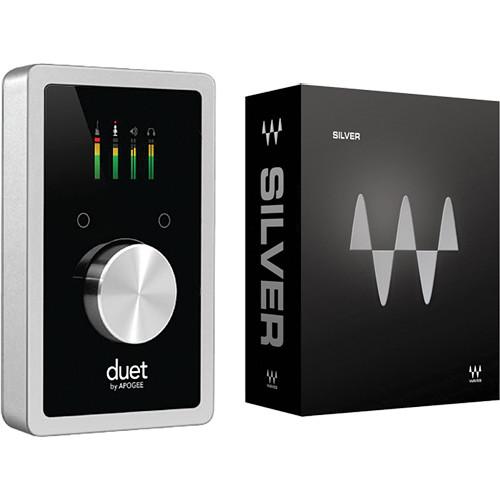
The Duet USB Audio Interface for iPad & Mac from Apogee is a portable audio interface that builds on the success of the Duet 2 by adding compatibility with iOS in addition to Mac. It provides a direct digital Lightning connection that allows for DC charging of the Apple device.
This interface is capable of making studio quality recordings of vocals, guitars, bass, keyboards, drums, and other sources. The unit's portability and option of being USB bus powered allows you to create music any time. The microphone preamps offer high-gain amplification for capturing performances clearly, and the outputs are capable of presenting detailed and well imaged sound for mixing and mastering.
The dual microphone preamps feature enhanced components and seamless, click-free transitions throughout the 75dB of gain. The preamps are optimized for any sound source, so no matter what's being recorded, it get's captured in detail. The interface utilizes an ESS Sabre32 32-bit hyperstream DAC with circuitry to eliminate time domain jitter and provide ample dynamic range and low distortion conversion. A full color, high-resolution OLED display is the main control center for the Duet, providing visual feedback for multiple functions including metering, numeric value for input and output levels, input grouping, phase, muting, phantom power and Soft Limit indication. The display provides immediate status of the inputs and outputs without having to refer to Maestro or the host recording software.
Stereo headphones or left and right mono speaker outs can be assigned in pairs to output 1-2 or 3-4 or the low latency mixer, and each can be placed in stereo, mono, muted or dimmed modes. It is possible for a DJ to monitor a separate mix in headphones while sending a house mix to the club, a live performer to send a click track to in-ear monitors while sending a backing track to front-of-house, and a recording engineer to send a headphone mix to the performer while dedicating the main outputs to studio monitors.
For use with iOS devices, an optional Lightning or 30-pin cable may be purchased. The Duet ships with a USB cable for connecting to your Mac.
Registering the interface online grants the user a serial code for a Waves Silver Plug-in Bundle which consists of 16 essential plug-ins for reverb, compression, and more. Specifically the bundle includes: C1 Compressor, DeEsser, Doubler, Enigma, IR-L Convolution Reverb, L1 Ultramaximizer, MaxxBass, MondoMod, PAZ Analyzer, Q10 Equalizer, Renaissance Axx, Renaissance Compressor, Renaissance Equalizer, S1 Stereo Imager, SuperTap, and TrueVerb.
If you own a Apogee Electronics audio interfaces and have a user manual in electronic form,
you can upload it to this website using the link on the right side of the screen.
You can upload and download the manual for the Apogee Electronics Duet USB Audio Interface DUET-MAC-IOS in the following formats:
*.pdf, *.doc, *.txt, *.jpg - Other formats are unfortunately not supported.
Additional parameters of the Apogee Electronics Duet USB Audio Interface DUET-MAC-IOS:
Mac: Any Mac Core Audio compatible application Recommended apps: Logic, GarageBand, MainStage, Final Cut, Pro Tools, Ableton Live, Digital Performer, Studio One, Cubase, and Nuendo
iOS: Any audio application
Interface
USB 2.0
Analog Input
1 x XLR microphone (on breakout cable) 1 x 1/4" TS phone instrument (on breakout cable)
Analog Output
2 x balanced line outputs, +20 dBu maximum output level 1 x independent 1/4" (6.4 mm) stereo headphone output
MIDI In/Out
Yes
Headphone Output
Yes
A/D Conversion
Max Input Level (+4 dBu ref): +20 dBu Max Input Level (-10 dBV ref): +6 dBV Input Impedance: 5 kOhm Frequency Response 20 Hz to 20 kHz: > ±0.2 dB (@44.1 kHz) Relative THD + N: -106 dB (@ 96 kHz) Dynamic Range: 114 dB (A-weighted)
D/A Conversion
Max Output Level (+4 dBu ref): +20 dBu Max Output Level (-10 dBV ref): +6 dBV Line Output Impedance: 90 ohm Max Output Level Headphones: 19 dBu HPH Output Impedance: 30 ohm Frequency Response 20 Hz to 20 kHz: > ±0.0 5dB (@44.1 kHz) Relative THD+N : -113 dB (@96 kHz) Dynamic Range: 123 dB (A-weighted)
Power Requirements
USB bus powered
System Requirements
Mac OS: Computer: Intel Mac 1.5 GHz or faster Memory: 2 GB RAM minimum, 4 GB recommended OS: 10.6.8, 10.7.5 or greater Connection and Power: Any available USB port on a Mac USB bus powered; DC power optional (DC power supply included)
iOS: iOS Version: 6 or greater Connection: Optional Lightning dock or 30-pin connector cable DC power required (DC power supply included)
The user manual for the Apogee Electronics Duet USB Audio Interface DUET-MAC-IOS can be downloaded in .pdf
format if it did not come with your new audio interfaces, although the seller is
required to supply one. It is also quite common that customers throw out
the user manual with the box, or put the CD away somewhere and then can’t find it.
That’s why we and other Apogee Electronics users keep a unique electronic library
for Apogee Electronics audio interfacess,
where you can use our link to download the user manual for the Apogee Electronics Duet USB Audio Interface DUET-MAC-IOS.
The user manual lists all of the functions of the Apogee Electronics Duet USB Audio Interface DUET-MAC-IOS,
all the basic and advanced features and tells you how to use the audio interfaces.
The manual also provides troubleshooting for common problems. Even greater
detail is provided by the service manual, which is not typically shipped with the product,
but which can often be downloaded from Apogee Electronics service.
If you want to help expand our database, you can upload a link to this website
to download a user manual or service manual, ideally in .pdf format. These pages
are created by you – users of the Apogee Electronics Duet USB Audio Interface DUET-MAC-IOS. User manuals are also
available on the Apogee Electronics website under Pro Audio - iOS/iPad - Audio Interfaces.
Question and answer discussion forum concerning user instructions and resolving problems with the Apogee Electronics Duet USB Audio Interface DUET-MAC-IOS - no comments have been made yet - be the first to add a comment
I would like to download the manual for my Intel Xeon e5-2699 v3 Processor. Thank you!...AEE P60 manual - AEE P60 Hands-Free Police Camera P60 Posted by: Alcibiades Ballesteros 2025-11-10 21:25:00
Hello, I need your help to send me the user manual to AEE P60 Police recording equipment; because I forget the password to the interface software...keyboard pdf - Microsoft Natural Ergonomic Keyboard 4000 - USB B2M-00012 Posted by: Robert See 2025-10-29 16:12:12
Please send me a pdf manual for my Microsoft ergonomic keyboard 4000...How to export recorded files to my computer - Olympus VN-7200 Digital Voice Recorder V404130BU000 Posted by: Terrence Cato 2025-10-27 15:30:17

 Question and answer discussion forum concerning user instructions and resolving problems with the Apogee Electronics Duet USB Audio Interface DUET-MAC-IOS - no comments have been made yet - be the first to add a comment