Operating instructions and pdf manual for use - ASUS Z170-K ATX Motherboard Z170-K User manual, User manual ASUS Z170-K ATX Motherboard Z170-K, ASUS, Z170-K, ATX, Motherboard, Z170-K, Video
User manual for ASUS Z170-K ATX Motherboard Z170-K
We recommend checking out our discussion threads on the ASUS Z170-K ATX Motherboard Z170-K,
which address similar problems with connecting and setting up Motherboards ASUS.
User manual for the ASUS Z170-K ATX Motherboard Z170-K
The user manual for the ASUS Z170-K ATX Motherboard Z170-K provides
necessary instructions for the proper use of the product Computers & Solutions - Computer Components - Motherboards.
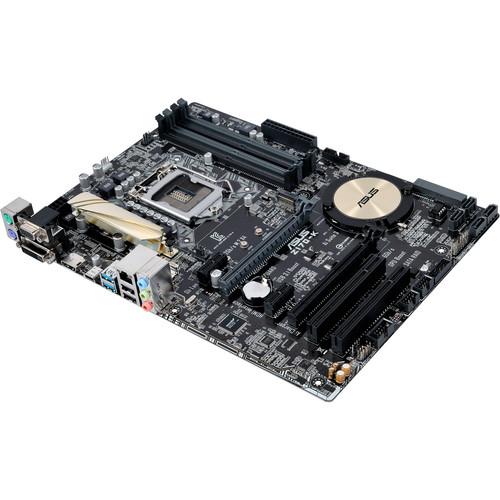
The ASUS Z170-K ATX Motherboard provides a suitable platform for building a solid PC system that uses a 6th-generation Intel processor and DDR4 RAM. Utilizing four DIMM slots, you can install up to 64GB of DDR4 memory, which can be overclocked up to 3466 MHz. The single PCIe 3.0 x4 M.2 connector offers a data transfer rate up to 32 Gb/s to support a high-speed SSD. The rear of the motherboard sports two USB 3.1 ports so your system can experience data transfer speeds of up to 10 Gb/s. Additionally, it comes with a USB type-C port that features a reversible design.
This Z170-K ATX motherboard is outfitted with two PCI Express x16 slots for supporting dedicated graphics cards in an AMD CrossFireX configuration. In addition, there are two PCIe 3.0 x1 and two PCI slots. Storage and optical drives connect using the motherboard's six SATA 6 Gb/s connectors. Moreover, you get a SATA Express connector that is backwards compatible with up to two SATA drives. For printers or other peripherals, this motherboard has two USB 2.0 ports. Networking comes from the Realtek RTL8111H controller while audio is delivered from the Realtek ALC887 codec. It also comes with three video and three audio ports as well as a single PS/2 keyboard port and one PS/2 mouse port.
If you own a ASUS motherboards and have a user manual in electronic form,
you can upload it to this website using the link on the right side of the screen.
You can upload and download the manual for the ASUS Z170-K ATX Motherboard Z170-K in the following formats:
*.pdf, *.doc, *.txt, *.jpg - Other formats are unfortunately not supported.
Additional parameters of the ASUS Z170-K ATX Motherboard Z170-K:
Integrated Intel HD Graphics supported Supports HDMI with max. resolution of 4096 x 2160 @ 24 Hz, 2560 x 1600 @ 60 Hz Supports DVI-D with max. resolution of 1920 x 1200 @ 60 Hz Supports VGA with max. resolution of 1920 x 1200 @ 60 Hz Maximum shared memory of 1024 MB Supports Intel InTru 3D, Quick Sync Video, Clear Video HD Technology, Insider
Multi-GPU Support
Supports AMD Quad-GPU CrossFireX technology
Expansion Slots
1 x PCIe 3.0/2.0 x16 (x16 mode, gray) 1 x PCIe 3.0/2.0 x16 (max at x4 mode) 2 x PCIe 3.0/2.0 x1 2 x PCI
Storage
Intel Z170 chipset 1 x M.2 Socket 3, with M key, type 2242/2260/2280 storage devices supported (both SATA & PCIE mode) 1 x SATA Express port, gray, compatible with 2 x SATA 6 Gb/s ports 6 x SATA 6 Gb/s ports, gray Supports Raid 0, 1, 5, 10 Supports Intel Smart Response Technology
LAN
Realtek RTL8111H Gigabit LAN controller
Audio
Realtek ALC887 8-channel high-definition audio codec Supports jack-detection and front panel jack retasking
USB
Intel Z170 chipset 4 x USB 3.0/2.0 (4 x headers at mid-board) 6 x USB 2.0/1.1 (2 x USB ports at back panel, type-A, 4 x headers at mid-board) 1 x USB 5 Gb/s port at back panel, type-C, reversible, supports 3 A power output)
ASMedia USB 3.1 controller 2 x USB 3.1/3.0/2.0 ports (2 at back panel, teal blue)
Supported Features
ASUS 5X Protection II: - ASUS LANGuard - 2.5 X higher surge tolerance - ASUS Overvoltage Protection - circuit-protecting power design - ASUS DIGI+ VRM - 7 phase digital power design - ASUS DRAM Overcurrent Protection - prevents damage from short circuits - ASUS Stainless-Steel Back I/O - 3 X corrosion-resistance for greater durability ASUS EPU ASUS Exclusive Features: - GPU Boost - AI Suite 3 - Ai Charger+ - M.2 & SATA Express - Anti-Surge - Low EMI Solution - USB 3.1 Boost - Disk Unlocker - Mobo Connect - PC Cleaner ASUS Quiet Thermal Solution: - Fanless design heat-sink solution & MOS heatsink - ASUS Fan Xpert 3 ASUS EZ DIY: - ASUS CrashFree BIOS 3 - ASUS EZ Flash 3 - ASUS UEFI BIOS EZ Mode - Push Notice ASUS Q-Design: - ASUS Q-Slot - ASUS Q-DIMM Media Streamer Audio: - LED-illuminated Design: Brighten up your build with an illuminated audio trace path - Audio Shielding: Ensures analog/digital separation and reduces multi-lateral interference - Dedicated Audio PCB Layers: Separate layers for left and right channels to guard the quality of the sensitive audio signals - Japanese-made Audio Capacitors: Provide warm, natural, and immersive sound with clarity and fidelity
Operating Systems Supported
Windows 10 64-bit Windows 8.1 64-bit Windows 7 32/64-bit
Back I/O Ports
1 x PS/2 keyboard (purple) 1 x PS/2 mouse (green) 1 x DVI-D 1 x D-Sub 1 x HDMI 1 x LAN (RJ-45) 1 x USB 5 Gb/s Type-C (3 A power output) 2 x USB 3.1 (teal blue) type-A 2 x USB 2.0 3 x Audio jacks
Internal I/O Ports
2 x USB 3.0 connectors support additional 4 x USB 3.0 ports (19-pin) 2 x USB 2.0 connectors support additional 4 x USB 2.0 ports 1 x SATA Express connector: gray, compatible with 2 x SATA 6 Gb/s ports 1 x M.2 Socket 3 for M Key, type 2242/2260/2280 devices 1 x COM connector 6 x SATA 6 Gb/s connectors 1 x CPU fan connector (1 x 4-pin) 2 x Chassis fan connectors (2 x 4-pin) 1 x S/PDIF out header 1 x 24-pin EATX power connector 1 x 8-pin ATX 12V power connector 1 x Front panel audio connector (AAFP) 1 x System panel 1 x Clear CMOS jumper
BIOS
128 Mb Flash ROM UEFI AMI BIOS, PnP, DMI3.0, WfM2.0, SM BIOS 3.0 ACPI 5.0, Multi-language BIOS, ASUS EZ Flash 3, CrashFree BIOS 3, F11 EZ Tuning Wizard, F6 Qfan Control, F3 My Favorites, Quick Note, Last Modified log, F12 PrintScreen, and ASUS DRAM SPD (Serial Presence Detect) memory information
The user manual for the ASUS Z170-K ATX Motherboard Z170-K can be downloaded in .pdf
format if it did not come with your new motherboards, although the seller is
required to supply one. It is also quite common that customers throw out
the user manual with the box, or put the CD away somewhere and then can’t find it.
That’s why we and other ASUS users keep a unique electronic library
for ASUS motherboardss,
where you can use our link to download the user manual for the ASUS Z170-K ATX Motherboard Z170-K.
The user manual lists all of the functions of the ASUS Z170-K ATX Motherboard Z170-K,
all the basic and advanced features and tells you how to use the motherboards.
The manual also provides troubleshooting for common problems. Even greater
detail is provided by the service manual, which is not typically shipped with the product,
but which can often be downloaded from ASUS service.
If you want to help expand our database, you can upload a link to this website
to download a user manual or service manual, ideally in .pdf format. These pages
are created by you – users of the ASUS Z170-K ATX Motherboard Z170-K. User manuals are also
available on the ASUS website under Computers & Solutions - Computer Components - Motherboards.
Question and answer discussion forum concerning user instructions and resolving problems with the ASUS Z170-K ATX Motherboard Z170-K - no comments have been made yet - be the first to add a comment

 Question and answer discussion forum concerning user instructions and resolving problems with the ASUS Z170-K ATX Motherboard Z170-K - no comments have been made yet - be the first to add a comment