User manual ASUS Z97-E/USB3.1 Motherboard Z97-E/USB 3.1
Operating instructions and pdf manual for use - ASUS Z97-E/USB3.1 Motherboard Z97-E/USB 3.1 User manual, User manual ASUS Z97-E/USB3.1 Motherboard Z97-E/USB 3.1, ASUS, Z97-E/USB3.1, Motherboard, Z97-E/USB, 3.1, Video
User manual for ASUS Z97-E/USB3.1 Motherboard Z97-E/USB 3.1
Overall Rating: 5.0
100% of respondents would recommend this to a friend.
We recommend checking out our discussion threads on the ASUS Z97-E/USB3.1 Motherboard Z97-E/USB 3.1,
which address similar problems with connecting and setting up Motherboards ASUS.
User manual for the ASUS Z97-E/USB3.1 Motherboard Z97-E/USB 3.1
The user manual for the ASUS Z97-E/USB3.1 Motherboard Z97-E/USB 3.1 provides
necessary instructions for the proper use of the product Computers & Solutions - Computer Components - Motherboards.
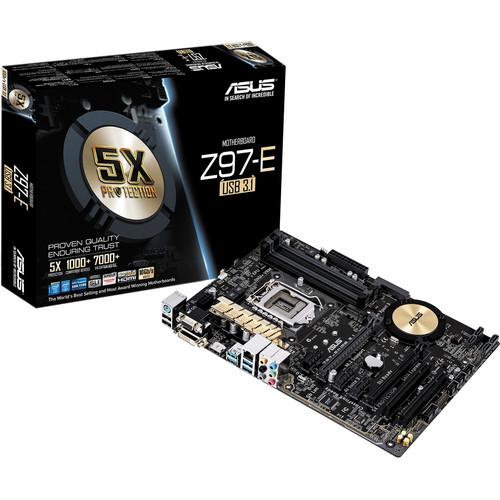
The Z97-E/USB3.1 Motherboard from ASUS is designed to fit in standard size ATX cases. The 12.0 x 8.6" Z97-E supports 5th, New 4th, and 4th Generation Core i7, Core i5, Core i3, Pentium, and Celeron processors in the LGA 1150 socket, as well as the Intel Z97 chipset. The Z97-E has been designed to deliver power and speed to Internet browsing, extreme gaming, and CAD software. This motherboard is compatible with Windows 8.1, 8, and 7 operating systems. It also supports USB 3.1 which can achieve data transfer rates of up to 10 Gb/s.
The ATX form factor of the Z97-E has four DIMM slots and can support up to 32GB of non-ECC, unbuffered DDR3 RAM at the following speeds - 3200(O.C.), 3100(O.C.), 3000(O.C.), 2933(O.C.), 2800(O.C.), 2666(O.C.), 2600(O.C.), 2400(O.C.), 2250(O.C.), 2200(O.C.), 2133(O.C.), 2000(O.C.), 1866(O.C.), 1600, and 1333 MHz. However, please be aware that the maximum base memory speed is 1600 MHz and anything higher is achieved through memory overclocking (O.C.).
The Z97-E has a total of 4 x SATA III 6 Gb/s connectors, 1 x SATA Express connector, 1 x M.2 Socket 3 connector, 2 x USB 3.1 ports, 4 x USB 3.0 ports, and 8 x USB 2.0 ports. To provide data redundancy, RAID 0, 1, 5, and 10 modes are supported. For PCIe expansion, there are two PCI Express 3.0/2.0 x16 slots (single at x16, dual at x8/x8), three PCI Express 2.0 x1 slots, and two PCI slots. While the X99S does lack an integrated GPU, it has been optimized for multiple graphics cards and has multi-GPU support for NVIDIA Quad-GPU SLI and AMD Quad-GPU CrossFireX technology.
The Z97-E is designed to be a complete solution provider. To this end, it undergoes over 7,000 hours of tests with over 1,000 products. The tests include temperature and humidity, burn-in, power on/off, power consumption, insertion, and thermal-shock testing, among many others. Every compatible component is also put through an up to 24-hour aging test to help ensure smooth daily operation.
The Z97-E/USB3.1 Motherboard is also equipped with 1 x PS/2 port, 1 x DVI-D port, 1 x D-Sub port, 1 x HDMI port that supports resolutions up to 4K, 1 x Gigabit LAN port, and 6 x audio jacks. It includes an I/O shield and two SATA III 6 Gb/s cables.
If you own a ASUS motherboards and have a user manual in electronic form,
you can upload it to this website using the link on the right side of the screen.
You can upload and download the manual for the ASUS Z97-E/USB3.1 Motherboard Z97-E/USB 3.1 in the following formats:
*.pdf, *.doc, *.txt, *.jpg - Other formats are unfortunately not supported.
Additional parameters of the ASUS Z97-E/USB3.1 Motherboard Z97-E/USB 3.1:
Specifications
CPU
Intel Socket 1150 for the 5th / New 4th / 4th Generation Core i7 / Core i5 / Core i3 / Pentium/Celeron Processors Supports Intel 22 nm CPU Supports Intel Turbo Boost Technology 2.0
2 x PCIe 3.0/2.0 x16 (Single at x16, dual at x8/x8) 3 x PCIe 2.0 x1 2 x PCI
Storage
Intel Z97 Chipset: 1 x SATA Express port, compatible with 2 x SATA 6.0 Gb/s ports 1 x M.2 Socket 3 with M key type 2242/2260/2280 storage devices support (both SATA & PCIE mode) 4 x SATA 6Gb/s ports, gray Supports RAID 0, 1, 5, 10 Supports Intel Smart Response Technology, Intel Rapid Start Technology, and Intel Smart Connect Technology
LAN
Intel I218V, 1 x Gigabit LAN Controller Intel LAN - Dual interconnect between the Integrated LAN controller and Physical Layer (PHY)
Audio
Realtek ALC892 8-Channel High Definition Audio CODEC featuring Crystal Sound 2 - Supports: Jack-detection, Multi-streaming, and Front Panel Jack-retasking
Audio Features - LED-lit Audio Shielding: Helps ensures precision analog/digital separation and reduced multi-lateral interference, with an illuminated trace path - Dedicated audio PCB layers: Separate layers for left and right channels to guard the quality of the audio signals - Audio amplifier: Provides the high quality sound for headphones and speakers - Japanese-made audio capacitors: Provides warm, natural, and immersive sound with strong clarity and fidelity - De-pop circuit: Helps reduces start-up popping noise to audio outputs
USB Ports
Intel Z97 chipset: 4 x USB 3.0/2.0 ports (2 at back panel, blue, 2 at mid-board)
Intel Z97 chipset: 8 x USB 2.0/1.1 ports (2 at back panel, black, 6 at mid-board)
ASMedia USB 3.1 controller: 2 x USB 3.1/3.0/2.0 ports (2 at back panel, teal blue)
Special Features
ASUS 5X Protection: - ASUS DIGI+ VRM - 6 Phase digital power design - ASUS Enhanced DRAM Overcurrent Protection - Short circuit damage prevention - ASUS ESD Guards - Enhanced ESD protection - ASUS High-Quality 5K-Hour Solid Capacitors - 2.5x long lifespan with excellent durability - ASUS Stainless Steel Back I/O - 3x more durable corrosion-resistant coating
ASUS EPU: - EPU
ASUS Exclusive Features: - TurboV EVO - GPU Boost - AI Suite 3 - Ai Charger+ - M.2 & SATA Express - Anti-Surge - USB 3.1 Boost - Crystal Sound 2
Interactive HomeCloud -Media Streamer
ASUS Quiet Thermal Solution - Fanless Design Heat-sink solution & MOS Heatsink - ASUS Fan Xpert 3
ASUS EZ DIY: - ASUS CrashFree BIOS 3 - ASUS EZ Flash 2 - ASUS UEFI BIOS EZ Mode - Push Notice
ASUS Q-Design: - ASUS Q-Slot
Operating System Support
Windows 8.1, 8, and 7
Back I/O Ports
1 x PS/2 keyboard/mouse combo port 1 x DVI-D 1 x D-Sub 1 x HDMI 1 x LAN (RJ45) port 2 x USB 3.1 (teal blue) 2 x USB 3.0 (blue) 2 x USB 2.0 6 x Audio jacks
Internal I/O Ports
1 x USB 3.0 connector supports an additional 2 USB 3.0 ports (19-pin) 3 x USB 2.0 connectors support an additional 6 USB 2.0 ports 1 x SATA Express connector: gray, compatible with 2 x SATA 6.0 Gb/s ports 1 x M.2 Socket 3 1 x TPM header 1 x COM port(s) connector 4 x SATA 6Gb/s connectors 1 x CPU Fan connector (1 x 4 -pin) 3 x Chassis Fan connectors (3 x 4 -pin) 1 x S/PDIF out header 1 x 24-pin EATX Power connector 1 x 8-pin ATX 12V Power connector 1 x Front panel audio connector (AAFP) 1 x System panel 1 x Clear CMOS jumper
BIOS
64 Mb Flash ROM, UEFI AMI BIOS, PnP, DMI2.7, WfM2.0, SM BIOS 2.8, ACPI 5.0, Multi-language BIOS, ASUS EZ Flash 2, CrashFree BIOS 3, F6 Qfan Control, F3 My Favorites & Shortcut, Quick Note, Last Modified log, F12 PrintScreen, and ASUS DRAM SPD (Serial Presence Detect) memory information
The user manual for the ASUS Z97-E/USB3.1 Motherboard Z97-E/USB 3.1 can be downloaded in .pdf
format if it did not come with your new motherboards, although the seller is
required to supply one. It is also quite common that customers throw out
the user manual with the box, or put the CD away somewhere and then can’t find it.
That’s why we and other ASUS users keep a unique electronic library
for ASUS motherboardss,
where you can use our link to download the user manual for the ASUS Z97-E/USB3.1 Motherboard Z97-E/USB 3.1.
The user manual lists all of the functions of the ASUS Z97-E/USB3.1 Motherboard Z97-E/USB 3.1,
all the basic and advanced features and tells you how to use the motherboards.
The manual also provides troubleshooting for common problems. Even greater
detail is provided by the service manual, which is not typically shipped with the product,
but which can often be downloaded from ASUS service.
If you want to help expand our database, you can upload a link to this website
to download a user manual or service manual, ideally in .pdf format. These pages
are created by you – users of the ASUS Z97-E/USB3.1 Motherboard Z97-E/USB 3.1. User manuals are also
available on the ASUS website under Computers & Solutions - Computer Components - Motherboards.
Question and answer discussion forum concerning user instructions and resolving problems with the ASUS Z97-E/USB3.1 Motherboard Z97-E/USB 3.1 - no comments have been made yet - be the first to add a comment


 Question and answer discussion forum concerning user instructions and resolving problems with the ASUS Z97-E/USB3.1 Motherboard Z97-E/USB 3.1 - no comments have been made yet - be the first to add a comment