User manual AVer C30u 30-Device USB Charge and Sync Cart CHRGEC30U
Operating instructions and pdf manual for use - AVer C30u 30-Device USB Charge and Sync Cart CHRGEC30U User manual, User manual AVer C30u 30-Device USB Charge and Sync Cart CHRGEC30U, AVer, C30u, 30-Device, USB, Charge, Sync, Cart, CHRGEC30U,
User manual for AVer C30u 30-Device USB Charge and Sync Cart CHRGEC30U
Startup and operation of the mobile charging stations
Tips for setting up your AVer
Settings and expert assistance
Contact AVer service
Troubleshooting
Warranty information
Click to enlarge image
We recommend checking out our discussion threads on the AVer C30u 30-Device USB Charge and Sync Cart CHRGEC30U,
which address similar problems with connecting and setting up Mobile Charging Stations AVer.
User manual for the AVer C30u 30-Device USB Charge and Sync Cart CHRGEC30U
The user manual for the AVer C30u 30-Device USB Charge and Sync Cart CHRGEC30U provides
necessary instructions for the proper use of the product A/V Presentation - Mounts & Carts - Mobile Charging Stations.
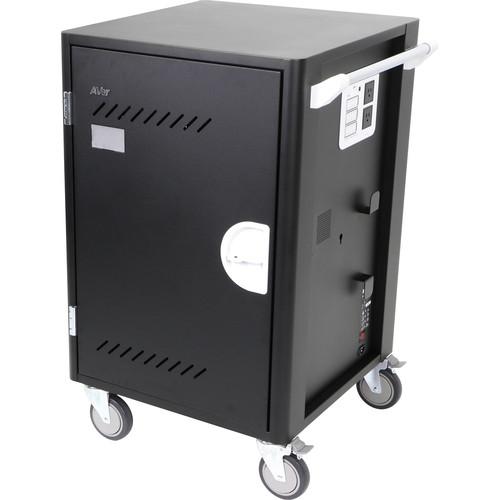
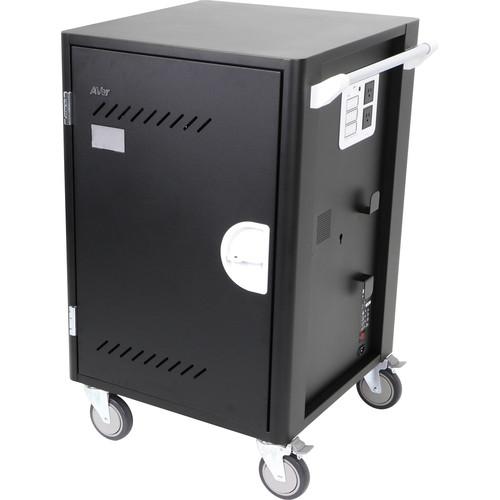
The C30u 30-Device USB Charge and Sync Cart from AVer can accommodate 30 USB-charged tablets, and it connects individually to simultaneously charge devices and sync applications. The charger is designed to automatically ensure all that devices are safely and evenly charged. Slide-out shelves with extra-large slots add ease and convenience to device management.
At only 27" wide, the C30u footprint is small and leaves more classroom real estate while managing your 1-to-1 devices. Its slide-out shelves make placing and pulling devices easy, comfortable and safe. Eliminating the need to reach in or pull devices out, the slide-out-shelves also reduce potential damage. The C30u features an extra-large 1.34 x 15" slot design which can accommodate the tablets in most protective cases.
If you own a AVer mobile charging stations and have a user manual in electronic form,
you can upload it to this website using the link on the right side of the screen.
You can upload and download the manual for the AVer C30u 30-Device USB Charge and Sync Cart CHRGEC30U in the following formats:
*.pdf, *.doc, *.txt, *.jpg - Other formats are unfortunately not supported.
Additional parameters of the AVer C30u 30-Device USB Charge and Sync Cart CHRGEC30U:
Specifications
Device Capacity
30
Slot Size
8.86 x 1.34 x 14.96" (22.5 x 3.4 x 38.0 cm)
Supported Devices
USB-charged Tablets
Charging Type
USB 2.0
External Power Outlets
2
LED Indicator
30 x Status LED 1 x USB-sync LED
Sliding Shelves
Yes
Divider Design
Metal bar with foam padding
Cable Management
Cable clips
Security
Front doors: 3 point mechanism with lock hole Security Hook
Casters
5" (12.7 cm) casters x 4 (2 lockable)
Power Specifications
AC in: 100 to 120 V ~ 50/60 Hz, 12 A 200 to 240 V ~ 50/60 Hz, 8 A
Output for 30 USB ports: DC 5V, 2.1A
Outlet: 2-Port Total: 100 to 120 V ~ 50/60 Hz, 4 A 200 to 240 V ~ 50/60 Hz, 2 A
AC Adapter
External Compartment Dimensions: 3.15 x 7.00 x 6.30" (8 x 17.8 x 16 cm)
Cart Dimensions
40.83 x 27.01 x 25.08" (103.7 x 68.6 x 63.7 cm)
Weight
168 lb (76 kg)
The user manual for the AVer C30u 30-Device USB Charge and Sync Cart CHRGEC30U can be downloaded in .pdf
format if it did not come with your new mobile charging stations, although the seller is
required to supply one. It is also quite common that customers throw out
the user manual with the box, or put the CD away somewhere and then can’t find it.
That’s why we and other AVer users keep a unique electronic library
for AVer mobile charging stationss,
where you can use our link to download the user manual for the AVer C30u 30-Device USB Charge and Sync Cart CHRGEC30U.
The user manual lists all of the functions of the AVer C30u 30-Device USB Charge and Sync Cart CHRGEC30U,
all the basic and advanced features and tells you how to use the mobile charging stations.
The manual also provides troubleshooting for common problems. Even greater
detail is provided by the service manual, which is not typically shipped with the product,
but which can often be downloaded from AVer service.
If you want to help expand our database, you can upload a link to this website
to download a user manual or service manual, ideally in .pdf format. These pages
are created by you – users of the AVer C30u 30-Device USB Charge and Sync Cart CHRGEC30U. User manuals are also
available on the AVer website under A/V Presentation - Mounts & Carts - Mobile Charging Stations.
Question and answer discussion forum concerning user instructions and resolving problems with the AVer C30u 30-Device USB Charge and Sync Cart CHRGEC30U - no comments have been made yet - be the first to add a comment

 Question and answer discussion forum concerning user instructions and resolving problems with the AVer C30u 30-Device USB Charge and Sync Cart CHRGEC30U - no comments have been made yet - be the first to add a comment