User manual Brother TZeS641 Tape with Extra-Strength Adhesive TZE-S641
Operating instructions and pdf manual for use - Brother TZeS641 Tape with Extra-Strength Adhesive TZE-S641 User manual, User manual Brother TZeS641 Tape with Extra-Strength Adhesive TZE-S641, Brother, TZeS641, Tape, with, Extra-Strength, Adhesive,
User manual for Brother TZeS641 Tape with Extra-Strength Adhesive TZE-S641
Overall Rating: 5.0
100% of respondents would recommend this to a friend.
We recommend checking out our discussion threads on the Brother TZeS641 Tape with Extra-Strength Adhesive TZE-S641,
which address similar problems with connecting and setting up Labels Brother.
User manual for the Brother TZeS641 Tape with Extra-Strength Adhesive TZE-S641
The user manual for the Brother TZeS641 Tape with Extra-Strength Adhesive TZE-S641 provides
necessary instructions for the proper use of the product Computers & Solutions - Printers & Accessories - Labels.
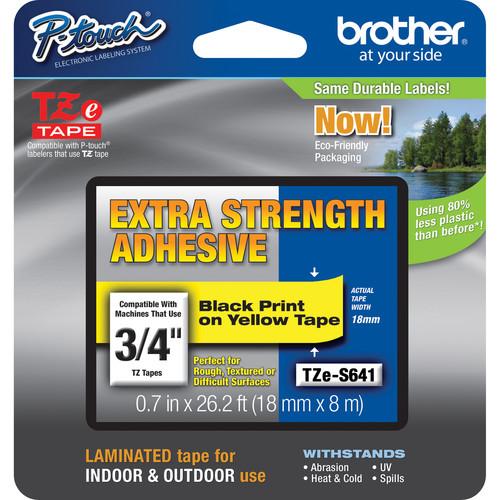
The black on yellow Brother TZeS641 with Extra-Strength Adhesive for P-Touch Labelers measures 0.7" x 26.2'. The extra strength adhesive is designed for use in harsh environments and can be used on textured, rough, or uneven surfaces. Additionally, the tape can be used on slippery painted metal items and powder-coated surfaces. The tape is designed for the following printers:
If you own a Brother labels and have a user manual in electronic form,
you can upload it to this website using the link on the right side of the screen.
You can upload and download the manual for the Brother TZeS641 Tape with Extra-Strength Adhesive TZE-S641 in the following formats:
*.pdf, *.doc, *.txt, *.jpg - Other formats are unfortunately not supported.
Additional parameters of the Brother TZeS641 Tape with Extra-Strength Adhesive TZE-S641:
The user manual for the Brother TZeS641 Tape with Extra-Strength Adhesive TZE-S641 can be downloaded in .pdf
format if it did not come with your new labels, although the seller is
required to supply one. It is also quite common that customers throw out
the user manual with the box, or put the CD away somewhere and then can’t find it.
That’s why we and other Brother users keep a unique electronic library
for Brother labelss,
where you can use our link to download the user manual for the Brother TZeS641 Tape with Extra-Strength Adhesive TZE-S641.
The user manual lists all of the functions of the Brother TZeS641 Tape with Extra-Strength Adhesive TZE-S641,
all the basic and advanced features and tells you how to use the labels.
The manual also provides troubleshooting for common problems. Even greater
detail is provided by the service manual, which is not typically shipped with the product,
but which can often be downloaded from Brother service.
If you want to help expand our database, you can upload a link to this website
to download a user manual or service manual, ideally in .pdf format. These pages
are created by you – users of the Brother TZeS641 Tape with Extra-Strength Adhesive TZE-S641. User manuals are also
available on the Brother website under Computers & Solutions - Printers & Accessories - Labels.
Question and answer discussion forum concerning user instructions and resolving problems with the Brother TZeS641 Tape with Extra-Strength Adhesive TZE-S641 - no comments have been made yet - be the first to add a comment


 Question and answer discussion forum concerning user instructions and resolving problems with the Brother TZeS641 Tape with Extra-Strength Adhesive TZE-S641 - no comments have been made yet - be the first to add a comment