User manual Chief TS525TU Thinstall Swing Arm Wall Mount TS525TU
Operating instructions and pdf manual for use - Chief TS525TU Thinstall Swing Arm Wall Mount TS525TU User manual, User manual Chief TS525TU Thinstall Swing Arm Wall Mount TS525TU, Chief, TS525TU, Thinstall, Swing, Arm, Wall, Mount, TS525TU,
User manual for Chief TS525TU Thinstall Swing Arm Wall Mount TS525TU
Overall Rating: 4.5
90% of respondents would recommend this to a friend.
We recommend checking out our discussion threads on the Chief TS525TU Thinstall Swing Arm Wall Mount TS525TU,
which address similar problems with connecting and setting up Monitor Wall Mounts Chief.
User manual for the Chief TS525TU Thinstall Swing Arm Wall Mount TS525TU
The user manual for the Chief TS525TU Thinstall Swing Arm Wall Mount TS525TU provides
necessary instructions for the proper use of the product A/V Presentation - Mounts & Carts - Monitor Wall Mounts.
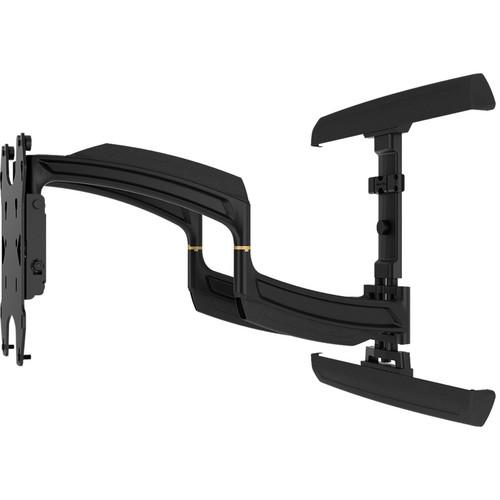
The Chief TS525TU Thinstall Swing Arm Wall Mount, with a weight capacity of 125 lbs (56.7 kg), is a mounting solution for all types of 37 to 58" (93.98 to 147.32 cm) TVs, including LED, LCD and Plasma. Integrating a low-profile design, the mount offers enhanced flexibility allowing it to be extended to 25” (635 mm) and collapsed to 1.5” (38mm).
Centris low-profile tilt technology enables quick and easy fingertip tilt adjustments up to 15˚. You can move the display laterally up to 16" (406 mm) to achieve the optimum viewing position via a centerless lateral shift mechanism.
With the integrated cable management feature, you can easily route power and signal cables via the wide open wall plate and the enclosed, tool-free cable covers. The TS525TU supports height adjustment up to 1" (25 mm), and comes in a black finish.
If you own a Chief monitor wall mounts and have a user manual in electronic form,
you can upload it to this website using the link on the right side of the screen.
You can upload and download the manual for the Chief TS525TU Thinstall Swing Arm Wall Mount TS525TU in the following formats:
*.pdf, *.doc, *.txt, *.jpg - Other formats are unfortunately not supported.
Additional parameters of the Chief TS525TU Thinstall Swing Arm Wall Mount TS525TU:
Specifications
Weight Capacity
125 lbs (56.7 kg
Compatibility
All types of 37 to 58" (93.98 to 147.32 cm) TVs, including LED, LCD and Plasma
Tilt
15˚
Finish
Black
Dimensions
Unit Dimensions: 20.73" x 32.33' x 1.5" (526 x 821 x 38 mm) Max Mounting Pattern: 15.75" x 31.5" (400 x 800 mm) Extends to 25" (635 mm) and collapses to 1.5" (38 mm) Height Adjust: 1" (25 mm)
The user manual for the Chief TS525TU Thinstall Swing Arm Wall Mount TS525TU can be downloaded in .pdf
format if it did not come with your new monitor wall mounts, although the seller is
required to supply one. It is also quite common that customers throw out
the user manual with the box, or put the CD away somewhere and then can’t find it.
That’s why we and other Chief users keep a unique electronic library
for Chief monitor wall mountss,
where you can use our link to download the user manual for the Chief TS525TU Thinstall Swing Arm Wall Mount TS525TU.
The user manual lists all of the functions of the Chief TS525TU Thinstall Swing Arm Wall Mount TS525TU,
all the basic and advanced features and tells you how to use the monitor wall mounts.
The manual also provides troubleshooting for common problems. Even greater
detail is provided by the service manual, which is not typically shipped with the product,
but which can often be downloaded from Chief service.
If you want to help expand our database, you can upload a link to this website
to download a user manual or service manual, ideally in .pdf format. These pages
are created by you – users of the Chief TS525TU Thinstall Swing Arm Wall Mount TS525TU. User manuals are also
available on the Chief website under A/V Presentation - Mounts & Carts - Monitor Wall Mounts.
Question and answer discussion forum concerning user instructions and resolving problems with the Chief TS525TU Thinstall Swing Arm Wall Mount TS525TU - no comments have been made yet - be the first to add a comment


 Question and answer discussion forum concerning user instructions and resolving problems with the Chief TS525TU Thinstall Swing Arm Wall Mount TS525TU - no comments have been made yet - be the first to add a comment