PDF-MANUALS.com | User manual here!
User manual

User manual DJI Phantom 2 Quadcopter v2.0 with Zenmuse H4-3D CP.PT.000142

Operating instructions and pdf manual for use - DJI Phantom 2 Quadcopter v2.0 with Zenmuse H4-3D CP.PT.000142 User manual, User manual DJI Phantom 2 Quadcopter v2.0 with Zenmuse H4-3D CP.PT.000142, DJI, Phantom, 2, Quadcopter, v2.0, with, Zenmuse,


User manual for DJI Phantom 2 Quadcopter v2.0 with Zenmuse H4-3D CP.PT.000142

Overall rating 4.0
Overall Rating: 4.0

80% of respondents would recommend this to a friend.
DJI Phantom 2 Quadcopter v2.0 with Zenmuse H4-3D CP.PT.000142
  • Manufacturer: DJI
  • Basic description and contents of package
  • Product classification: Camcorders - Aerial Imaging & Drones - Aerial Imaging Platforms & Drones
  • Safety instructions
  • Startup and operation of the aerial imaging platforms & drones
  • Tips for setting up your DJI
  • Settings and expert assistance
  • Contact DJI service
  • Troubleshooting
  • Warranty information
  • Price: 549 USD
We recommend checking out our discussion threads on the DJI Phantom 2 Quadcopter v2.0 with Zenmuse H4-3D CP.PT.000142, which address similar problems with connecting and setting up Aerial Imaging Platforms & Drones DJI.


User manual for the DJI Phantom 2 Quadcopter v2.0 with Zenmuse H4-3D CP.PT.000142

The user manual for the DJI Phantom 2 Quadcopter v2.0 with Zenmuse H4-3D CP.PT.000142 provides necessary instructions for the proper use of the product Camcorders - Aerial Imaging & Drones - Aerial Imaging Platforms & Drones.

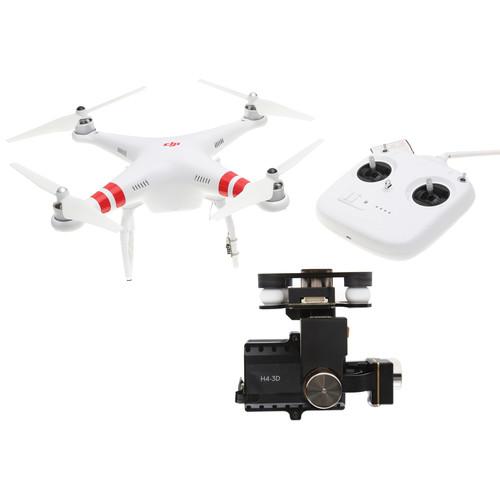
The Phantom 2 Quadcopter v2.0 with Zenmuse H4-3D Gimbal Kit is a bundle from DJI allowing you to capture stabilized aerial video and photos with a GoPro HERO4 action camera (GoPro available separately). This version of the Phantom 2 - v2.0 - features more efficient motors, ESCs, and props than the predecessor for extended flying time. Additionally, a redesigned transmitter (handheld radio controller) now features an integrated gimbal control dial and a rechargeable battery.

This bundle is considered ready-to-fly, which means the transmitter, flight battery, charger, and other basics are included and that the aircraft is mostly assembled. It will still require proper pre-flight calibration to setup the navigation system before each flight.

For more information on the items in this bundle, please follow the links below.
If you own a DJI aerial imaging platforms & drones and have a user manual in electronic form, you can upload it to this website using the link on the right side of the screen.

You can upload and download the manual for the DJI Phantom 2 Quadcopter v2.0 with Zenmuse H4-3D CP.PT.000142 in the following formats:
  • *.pdf, *.doc, *.txt, *.jpg - Other formats are unfortunately not supported.
Additional parameters of the DJI Phantom 2 Quadcopter v2.0 with Zenmuse H4-3D CP.PT.000142:
Specifications
    • Phantom 2 Quadcopter v2.0
      Performance
      Hover Accuracy Vertical: 2.6' / 0.8 m
      Horizontal: 8.2' / 2.5 m
      Max Yaw Angular Velocity 200°/s
      Max Tilt Angle 35°
      Maximum Ascent/Descent Speed Ascent: 19.7 fps / 6 m/s
      Descent: 6.6 fps / 2 m/s
      Maximum Flight Velocity 49.2 fps / 15 m/s (not recommended)
      Flight Time Up to 25 minutes per battery
      Takeoff Weight ≤ 2.9 lb / 1.3 kg
      Operating Temperature 14 to 122°F / -10 to 50°C
      Flight Control System
      Model Phantom 2
      Connectivity 1 x Micro-USB for user with Assistant Software
      System Requirements Assistant Software: Windows or OS X
      Motors
      Model CCW: Phantom 2 2312 Motor (Part 10)
      CW: Phantom 2 2312 Motor (Part 11)
      Recommended Takeoff Weight 10.6 oz / 300 g per axis
      Maximum Tension 1.8 lb / 800 g per axis
      Stator Size 0.9 x 0.5" / 23 x 12 mm
      Motor Velocity Constant KV: 960 rpm/V
      Working Temperature 23 to 104°F / -5 to 40°C
      Weight 1.9 oz / 55 g
      Transmitter
      Model Phantom 2 Remote Control (Part 13)
      Operating Frequency 2.4 GHz ISM
      Communication Distance Open Area: 3280.8' / 1000 m
      Receiver Sensitivity At 1% PER: -97 dBm
      Working Current/Voltage 120 mA at 3.7 VDC
      Power Requirements Built-In Lithium-Polymer Battery: 3.7 V, 2000 mAh
      Propellers
      Model Phantom 2 9450 Self-tightening Propellers (1 x CW and 1 x CCW per set; Part 12)
      Attachment Self-tightening
      Diameter x Pitch 9.4 x 5" / 23.9 x 12.7 cm
      Maximum Thrust 1.5 lb / 660 g (with 2212 motor KV 920 at 12 V)
      Battery
      Type 3S lithium-polymer
      Capacity 5200 mAh, 11.1 VDC
      Charging Environment Range 32 to 104°F / 0 to 40°C
      Discharging Environment Range -4 to 122°F / -20 to 50°C
      General
      Power Requirements DJI Phantom 2 Smart Battery
      Dimensions Diagonal: 13.8" / 350 mm
      Weight 2.2 lb / 1 kg
      Packaging Info
      Box Dimensions (LxWxH) 14.8 x 13.0 x 8.4"
    • Zenmuse H4-3D Gimbal for GoPro HERO4 Black
      Performance
      Angular Vibration Range Pitch/Roll: ±0.02°
      Yaw: ±0.03°
      Maximum Rotation Speed Tilt Axis: ±130°/s
      Controlled Rotation Range Tilt Axis Control: ‐130° to +45°
      Electrical and Mechanical
      Working Current Static Current: 400 mA (at 12 V)
      Dynamic Current: 600 mA (at 12 V)
      Power Requirements 3S to 6S (12 V to 26 V)
      General
      Camera Compatibility GoPro HERO4 Black only
      Supported Flight Control Systems A2
      WooKong-M
      NAZA-M
      NAZA-M V2

      Note: The NAZA‐M LITE is not supported. Additionally, the NAZA‐M V2 PMU must be installed if using a NAZA‐M V1 flight controller
      Operating Temperature 50 to 122°F / 10 to 50°C
      Dimensions 4.1 x 3.6 x 3.1" / 103 x 92 x 80 mm
      Weight Gimbal: 5.9 oz / 168 g
      GCU: 0.8 oz / 22 g
      Packaging Info
      Box Dimensions (LxWxH) 4.6 x 4.2 x 3.6"
    B&H Hands-on Learning Videos
    1. Unboxing 6:44
    2. Software 6:45
    3. First Flight 8:30
    4. Flight Modes 6:24
    5. Accessories 5:18
    The user manual for the DJI Phantom 2 Quadcopter v2.0 with Zenmuse H4-3D CP.PT.000142 can be downloaded in .pdf format if it did not come with your new aerial imaging platforms & drones, although the seller is required to supply one. It is also quite common that customers throw out the user manual with the box, or put the CD away somewhere and then can’t find it. That’s why we and other DJI users keep a unique electronic library for DJI aerial imaging platforms & droness, where you can use our link to download the user manual for the DJI Phantom 2 Quadcopter v2.0 with Zenmuse H4-3D CP.PT.000142.

    The user manual lists all of the functions of the DJI Phantom 2 Quadcopter v2.0 with Zenmuse H4-3D CP.PT.000142, all the basic and advanced features and tells you how to use the aerial imaging platforms & drones. The manual also provides troubleshooting for common problems. Even greater detail is provided by the service manual, which is not typically shipped with the product, but which can often be downloaded from DJI service.

    If you want to help expand our database, you can upload a link to this website to download a user manual or service manual, ideally in .pdf format. These pages are created by you – users of the DJI Phantom 2 Quadcopter v2.0 with Zenmuse H4-3D CP.PT.000142. User manuals are also available on the DJI website under Camcorders - Aerial Imaging & Drones - Aerial Imaging Platforms & Drones.


    Discussion Question and answer discussion forum concerning user instructions and resolving problems with the DJI Phantom 2 Quadcopter v2.0 with Zenmuse H4-3D CP.PT.000142 - no comments have been made yet - be the first to add a comment


    Post new comment/question/response regarding the DJI Phantom 2 Quadcopter v2.0 with Zenmuse H4-3D CP.PT.000142

    Fields marked with * must be filled out.
    Your name *:
    E-mail :
    Subject *:
    Message text *:
    Enter the code *:
    (spam block)
    "manual"
    If you would like to receive a response to your comment, don’t forget to include your e-mail address. Your e-mail will not be displayed or otherwise used in any way.


    Can't find what you're looking for? Try Google Search!


    Current discussions
    Most recently discussed products:

    manual - Manfrotto MHXPRO-BHQ6 XPRO Ball Head with Top Lock MHXPRO-BHQ6
    Posted by: wade
    2026-02-24 02:28:53

    manual...
    battery replacement - Tasco 1x30 Red Dot Sight BKRD30
    Posted by: Al Johnson
    2026-02-12 18:40:31

    ...
    DSC-HX400v - Sony Cyber-shot DSC-HX400V Digital Camera DSCHX400/B
    Posted by: Horacio Undurraga
    2026-01-19 14:13:28

    GPS HD AVCHD Gps Manual...
    manual for lot6 - Overland Tandberg Data LTO-6 SAS External Drive Kit 3535-LTO
    Posted by: manual lto-6
    2026-01-06 19:22:16

    i need the manual...
    manual for lto 6 - Overland Tandberg Data LTO-6 SAS External Drive Kit 3535-LTO
    Posted by: Frantz
    2026-01-06 19:21:43

    i would like to consult the manual...

    Uploaded instruction manuals
    Upload a link to an instruction manual for a depicted product here:

    Link format "http://www.link2manual.com/manual.pdf"

    Enter the code: "manual"


    PDF-MANUALS.com - Community administered database of instructions for use and PDF User manual
    sitemap.txt alx