|
User manual for HP Scanjet Enterprise Flow 5000 s2 Document Scanner L2738A#BGJ

Overall Rating: 5.0
100% of respondents would recommend this to a friend.
- Manufacturer: HP
- Basic description and contents of package
- Product classification: Photography - Scanners - Flatbed & Document Scanners
- Safety instructions
- Startup and operation of the flatbed & document scanners
- Tips for setting up your HP
- Settings and expert assistance
- Contact HP service
- Troubleshooting
- Warranty information
- Price: 731 USD
|
We recommend checking out our discussion threads on the HP Scanjet Enterprise Flow 5000 s2 Document Scanner L2738A#BGJ,
which address similar problems with connecting and setting up Flatbed & Document Scanners HP.
|
User manual for the HP Scanjet Enterprise Flow 5000 s2 Document Scanner L2738A#BGJ
The user manual for the HP Scanjet Enterprise Flow 5000 s2 Document Scanner L2738A#BGJ provides
necessary instructions for the proper use of the product Photography - Scanners - Flatbed & Document Scanners.
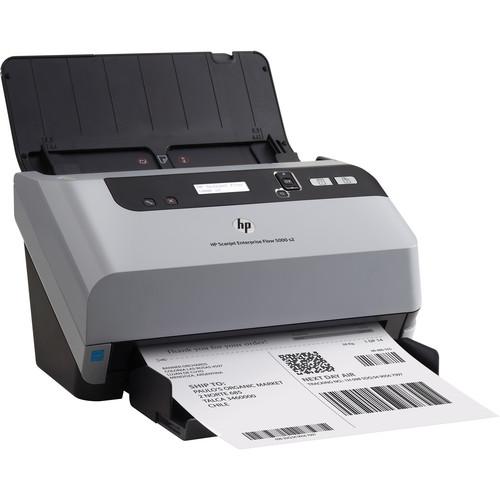
The HP Scanjet Enterprise Flow 5000 s2 Document Scanner is a high-quality office scanner featuring a 50-sheet automatic document feeder for scanning efficiency. The Scanjet Enterprise Flow 5000 s2 features a 600 dpi optical resolution and a daily duty cycle of 2,000 pages, making this a very durable machine for high workload situations. Also, with speeds of 25 pages per minute or 50 images per minute at 300 dpi, this scanner is capable of quickly producing high quality digital documents.
For versatility, this scanner can work with documents up to 8.5 x 122", useful for most documents and spreadsheets in an office setting. Also, duplex scanning as well as multi-feed detection make this a scanner that can be left on its own to work with a variety of different media types and sizes. It can even scan to a network drive or cloud storage as well as a variety of online cloud services.
This scanner connects to a Windows computer with a USB 2.0 cable and includes a CD with scanning software, a DVD Bonus Pack, a power supply and cord, and a cleaning cloth for the ADF.
|
If you own a HP flatbed & document scanners and have a user manual in electronic form,
you can upload it to this website using the link on the right side of the screen.
You can upload and download the manual for the HP Scanjet Enterprise Flow 5000 s2 Document Scanner L2738A#BGJ in the following formats:
- *.pdf, *.doc, *.txt, *.jpg - Other formats are unfortunately not supported.
|
Additional parameters of the HP Scanjet Enterprise Flow 5000 s2 Document Scanner L2738A#BGJ:
| Scanner Type | Sheetfed document scanner | | Scan Sensor | Contact Image Sensor (CIS) | | Optical Resolution | 600 dpi | | Output Resolution | 75, 100, 150, 200, 240, 300, 400, 500, or 600 dpi | | Color Depth | Internal: 48-bit
External: 24-bit | | Grayscale | 256 levels | | Scan Speed | ADF, A4/Letter-Sized: Up to 25 ppm & 50 ipm, black & white or color at 300 dpi | | Daily Duty Scan (Sheets) | 2,000 | | Batch Scanning | Yes | | Automatic Document Feeder | Yes, 50 sheets | | Scan File Format | PDF (image only, searchable, MRC, PDF/A, encrypted), TIFF (single page, multi-page, compressed: G3, G4, LZW, JPEG), DOC, RTF, WPD, XLS, TXT, XML, XPS, HTML, OPF, JPG, BMP, PNG | | Internal Memory | 256 MB | | Media Types | Paper (plain, inkjet), envelopes, labels, cards (business, insurance, embossed, plastic ID, credit) | | Media Weight | 11-56 lb (41-209 gsm) | | Paper Sizes | Letter, legal, A4, A5, A6, A8, custom sizes up to 8.5 x 122" (21.6 x 309.8 cm) | | Duplex Scanning | Yes | | TWAIN Version | 2.1 | | Interface | USB 2.0 | | Digital Sending Features | Local or network folder, e-mail, SharePoint 2007 & 2010, Office 365, Cloud destinations including HP Flow CM, Google Drive, SkyDrive, Box, Dropbox, Evernote, SugarSync, FTP, printer, fax, user-defined command-line application, web folder | | System & Software Requirements | Windows 8, 7, & Vista:
2 GHz processor
2 GB RAM
177 MB free hard disk space
USB 2.0 port
1024 x 768 display resolution
Windows XP SP3:
1.6 GHz processor
1 GB RAM
177 MB free hard disk space
USB 2.0 port
1024 x 768 display resolution | | Light Source | LED | | LCD Display | 2 line, 16 character display | | Front Panel Controls | Buttons (Simplex, Duplex) | | Operating Conditions | Temperature: 50 to 95°F (10 to 35°C)
Humidity: 15-80% (non-condensing) | | Storage Conditions | Temperature: -40 to 149°F
Humidity: 0-90% (non-condensing) | | Power Requirements | 100-240 V AC, 50/60 Hz, 1.6 A | | Power Consumption | Scanning: 26.4 W
Ready: 5.3 W
Sleep: 1.4 W
Auto-Off: 0.2 W
Off: 0.2 W | | ENERGY STAR Qualified | Yes | | EuP Compliant | Yes | | Dimensions (WxDxH) | 12.2 x 7.2 x 7.2" (31.0 x 18.2 x 18.4 cm)
With Trays Extended: 12.2 x 22.3 x 14.2" (31.0 x 56.6 x 36.2 cm) | | Weight | 10.6 lb (4.8 kg) | | Package Weight | 15.05 lb | | Box Dimensions (LxWxH) | 15.748 x 13.543 x 12.284" | |
The user manual for the HP Scanjet Enterprise Flow 5000 s2 Document Scanner L2738A#BGJ can be downloaded in .pdf
format if it did not come with your new flatbed & document scanners, although the seller is
required to supply one. It is also quite common that customers throw out
the user manual with the box, or put the CD away somewhere and then can’t find it.
That’s why we and other HP users keep a unique electronic library
for HP flatbed & document scannerss,
where you can use our link to download the user manual for the HP Scanjet Enterprise Flow 5000 s2 Document Scanner L2738A#BGJ.
The user manual lists all of the functions of the HP Scanjet Enterprise Flow 5000 s2 Document Scanner L2738A#BGJ,
all the basic and advanced features and tells you how to use the flatbed & document scanners.
The manual also provides troubleshooting for common problems. Even greater
detail is provided by the service manual, which is not typically shipped with the product,
but which can often be downloaded from HP service.
If you want to help expand our database, you can upload a link to this website
to download a user manual or service manual, ideally in .pdf format. These pages
are created by you – users of the HP Scanjet Enterprise Flow 5000 s2 Document Scanner L2738A#BGJ. User manuals are also
available on the HP website under Photography - Scanners - Flatbed & Document Scanners.
 Question and answer discussion forum concerning user instructions and resolving problems with the HP Scanjet Enterprise Flow 5000 s2 Document Scanner L2738A#BGJ - no comments have been made yet - be the first to add a comment
Post new comment/question/response regarding the HP Scanjet Enterprise Flow 5000 s2 Document Scanner L2738A#BGJ
|
|
|
|
|
