|
User manual for IOGEAR Greenpoint Pro 2.4GHz Gyroscopic Mouse with Laser GME435G

Overall Rating: 4.5
90% of respondents would recommend this to a friend.
- Manufacturer: IOGEAR
- Basic description and contents of package
- Product classification: A/V Presentation - Whiteboards, Easels & Displays - Wireless/Laser Presenters
- Safety instructions
- Startup and operation of the wireless/laser presenters
- Tips for setting up your IOGEAR
- Settings and expert assistance
- Contact IOGEAR service
- Troubleshooting
- Warranty information
- Price: 40 USD
|
We recommend checking out our discussion threads on the IOGEAR Greenpoint Pro 2.4GHz Gyroscopic Mouse with Laser GME435G,
which address similar problems with connecting and setting up Wireless/Laser Presenters IOGEAR.
|
User manual for the IOGEAR Greenpoint Pro 2.4GHz Gyroscopic Mouse with Laser GME435G
The user manual for the IOGEAR Greenpoint Pro 2.4GHz Gyroscopic Mouse with Laser GME435G provides
necessary instructions for the proper use of the product A/V Presentation - Whiteboards, Easels & Displays - Wireless/Laser Presenters.
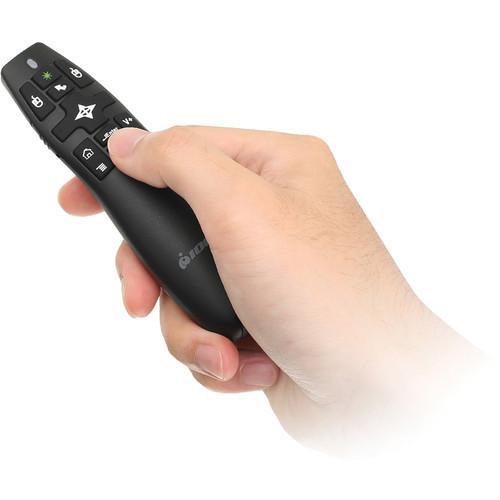
The Greenpoint Pro 2.4GHz Gyroscopic Mouse with Laser Pointer from IOGEAR is a wireless presentation remote that is compatible with Windows and Mac. It has a built-in gyroscopic mouse that helps you to more efficiently take control of your PowerPoint or Keynote presentations, as well as control your computer. Control can be swapped between presentation mode and cursor control with the simple press of a button.
The Greenpoint Pro operates on a wireless frequency of 2.4 GHz and has a range of up to 65.6' / 20.0 m away from its wireless dongle, allowing you the freedom to walk around during your presentation. Its bright Class 3a built-in green laser pointer has a range of 164' / 50 m and is easily visible, even in dark environments. This will help people focus on key parts of a presentation.
This device has a compact, lightweight design and is easily portable. To aid in its portability, its wireless USB receiver is stored within the pointing device. This also helps ensure that the USB receiver is not lost. The Greenpoint Pro is powered by two included AAA batteries.
|
If you own a IOGEAR wireless/laser presenters and have a user manual in electronic form,
you can upload it to this website using the link on the right side of the screen.
You can upload and download the manual for the IOGEAR Greenpoint Pro 2.4GHz Gyroscopic Mouse with Laser GME435G in the following formats:
- *.pdf, *.doc, *.txt, *.jpg - Other formats are unfortunately not supported.
|
Additional parameters of the IOGEAR Greenpoint Pro 2.4GHz Gyroscopic Mouse with Laser GME435G:
| Radio Frequency | 2.4 GHz | | Wireless Range | 65.6' / 20.0 m | | Laser Range | 164' / 50 m | | Power Supply | 2 x AAA batteries | | LED | Power On - Blue | | Connectors | USB 2.0 type-A port | | Operating System | Windows 8.1, 8, 7, Vista, and XP
Mac OS X 10.6 or Later | | Dimensions | 4.63 x 1.13 x 1.50" / 11.76 x 2.87 x 3.81 cm | | Weight | 0.10 lb / 0.05 kg | | Package Weight | 0.35 lb | | Box Dimensions (LxWxH) | 8.0 x 6.4 x 1.6" | |
The user manual for the IOGEAR Greenpoint Pro 2.4GHz Gyroscopic Mouse with Laser GME435G can be downloaded in .pdf
format if it did not come with your new wireless/laser presenters, although the seller is
required to supply one. It is also quite common that customers throw out
the user manual with the box, or put the CD away somewhere and then can’t find it.
That’s why we and other IOGEAR users keep a unique electronic library
for IOGEAR wireless/laser presenterss,
where you can use our link to download the user manual for the IOGEAR Greenpoint Pro 2.4GHz Gyroscopic Mouse with Laser GME435G.
The user manual lists all of the functions of the IOGEAR Greenpoint Pro 2.4GHz Gyroscopic Mouse with Laser GME435G,
all the basic and advanced features and tells you how to use the wireless/laser presenters.
The manual also provides troubleshooting for common problems. Even greater
detail is provided by the service manual, which is not typically shipped with the product,
but which can often be downloaded from IOGEAR service.
If you want to help expand our database, you can upload a link to this website
to download a user manual or service manual, ideally in .pdf format. These pages
are created by you – users of the IOGEAR Greenpoint Pro 2.4GHz Gyroscopic Mouse with Laser GME435G. User manuals are also
available on the IOGEAR website under A/V Presentation - Whiteboards, Easels & Displays - Wireless/Laser Presenters.
 Question and answer discussion forum concerning user instructions and resolving problems with the IOGEAR Greenpoint Pro 2.4GHz Gyroscopic Mouse with Laser GME435G
Post new comment to IOGEAR Greenpoint Pro 2.4GHz Gyroscopic Mouse with Laser GME435G
| Subject: IOGear Greenpoint GME435G | | Date: 26.10.2016 17:47:39 | Author: Scott Eppler | | Just took it out of the box. Put in batteries, stuck in the USB receiver. Windows downloaded drivers, all is good EXCEPT, the laser doesn't work. Anyone have any suggestions?!?!? | | Reply |
Post new comment/question/response regarding the IOGEAR Greenpoint Pro 2.4GHz Gyroscopic Mouse with Laser GME435G
|
|
|
|
|
