User manual for IsoAcoustics ISO-L8R200 Large Studio Monitor ISO-L8R200

Overall Rating: 5.0
100% of respondents would recommend this to a friend.
- Manufacturer: IsoAcoustics
- Basic description and contents of package
- Product classification: Pro Audio - Recording - Studio Monitor Stands
- Safety instructions
- Startup and operation of the studio monitor stands
- Tips for setting up your IsoAcoustics
- Settings and expert assistance
- Contact IsoAcoustics service
- Troubleshooting
- Warranty information
- Price: 160 USD
|
We recommend checking out our discussion threads on the IsoAcoustics ISO-L8R200 Large Studio Monitor ISO-L8R200,
which address similar problems with connecting and setting up Studio Monitor Stands IsoAcoustics.
|
User manual for the IsoAcoustics ISO-L8R200 Large Studio Monitor ISO-L8R200
The user manual for the IsoAcoustics ISO-L8R200 Large Studio Monitor ISO-L8R200 provides
necessary instructions for the proper use of the product Pro Audio - Recording - Studio Monitor Stands.
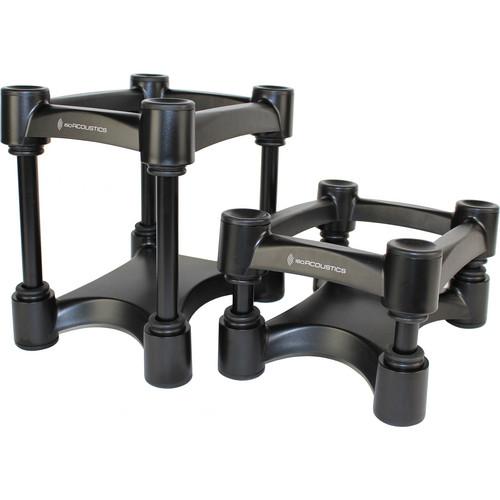
This pair of IsoAcoustics ISO-L8R200 Large Studio Monitor Isolators prevent the transfer of speaker cabinet energy to surrounding surfaces, effectively isolating the speaker. By allowing the speaker to perform in free space, it's able to sound the way it was intended.
The height and tilt angle of the ISO-L8R200 is adjustable to optimize positioning relative to the listener. The included 2 sets of height tubing along with 2 sets of end-plug pairs provide 14 steps of height adjustment. The different combinations are used to tilt the speaker up and down. The stand can be assembled and reconfigured repeatedly to establish the ideal position.
The ISO-L8R200 isolators are designed to support large monitor speakers no heavier than 60 pounds. They can be set to raise your speakers either 4" or 8" from the supporting surface.
|
If you own a IsoAcoustics studio monitor stands and have a user manual in electronic form,
you can upload it to this website using the link on the right side of the screen.
You can upload and download the manual for the IsoAcoustics ISO-L8R200 Large Studio Monitor ISO-L8R200 in the following formats:
- *.pdf, *.doc, *.txt, *.jpg - Other formats are unfortunately not supported.
|
Additional parameters of the IsoAcoustics ISO-L8R200 Large Studio Monitor ISO-L8R200:
| Height | Adjustable, 4 or 8" (101.5 or 203 mm) | | Dimensions (WxD) | 7.8 x 10" (198 x 254 mm) | | Package Weight | 7.8 lb | | Box Dimensions (LxWxH) | 16.3 x 10.5 x 5.5" | |
The user manual for the IsoAcoustics ISO-L8R200 Large Studio Monitor ISO-L8R200 can be downloaded in .pdf
format if it did not come with your new studio monitor stands, although the seller is
required to supply one. It is also quite common that customers throw out
the user manual with the box, or put the CD away somewhere and then can’t find it.
That’s why we and other IsoAcoustics users keep a unique electronic library
for IsoAcoustics studio monitor standss,
where you can use our link to download the user manual for the IsoAcoustics ISO-L8R200 Large Studio Monitor ISO-L8R200.
The user manual lists all of the functions of the IsoAcoustics ISO-L8R200 Large Studio Monitor ISO-L8R200,
all the basic and advanced features and tells you how to use the studio monitor stands.
The manual also provides troubleshooting for common problems. Even greater
detail is provided by the service manual, which is not typically shipped with the product,
but which can often be downloaded from IsoAcoustics service.
If you want to help expand our database, you can upload a link to this website
to download a user manual or service manual, ideally in .pdf format. These pages
are created by you – users of the IsoAcoustics ISO-L8R200 Large Studio Monitor ISO-L8R200. User manuals are also
available on the IsoAcoustics website under Pro Audio - Recording - Studio Monitor Stands.
 Question and answer discussion forum concerning user instructions and resolving problems with the IsoAcoustics ISO-L8R200 Large Studio Monitor ISO-L8R200 - no comments have been made yet - be the first to add a comment
Post new comment/question/response regarding the IsoAcoustics ISO-L8R200 Large Studio Monitor ISO-L8R200
|
|
