|
User manual for Marshall Electronics V-LCD56MD 5.6" HDMI V-LCD56MD-O

Overall Rating: 5.0
100% of respondents would recommend this to a friend.
- Manufacturer: Marshall Electronics
- Basic description and contents of package
- Product classification: Professional Video - Monitors - On Camera Monitors
- Safety instructions
- Startup and operation of the on camera monitors
- Tips for setting up your Marshall Electronics
- Settings and expert assistance
- Contact Marshall Electronics service
- Troubleshooting
- Warranty information
- Price: 814 USD
|
We recommend checking out our discussion threads on the Marshall Electronics V-LCD56MD 5.6" HDMI V-LCD56MD-O,
which address similar problems with connecting and setting up On Camera Monitors Marshall Electronics.
|
User manual for the Marshall Electronics V-LCD56MD 5.6" HDMI V-LCD56MD-O
The user manual for the Marshall Electronics V-LCD56MD 5.6" HDMI V-LCD56MD-O provides
necessary instructions for the proper use of the product Professional Video - Monitors - On Camera Monitors.
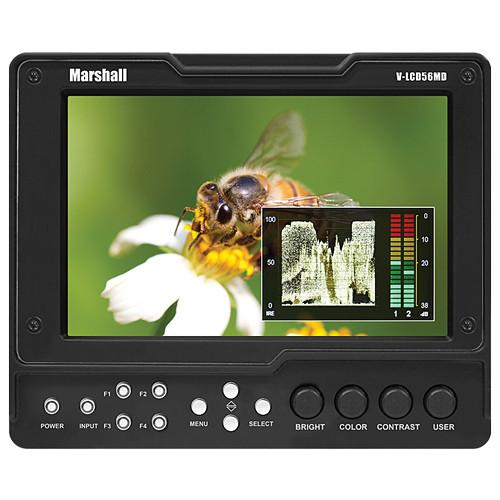
The Marshall Electronics V-LCD56MD 5.6" HDMI Monitor with 3G SDI Output Module is a 1280 x 800 high-resolution camera-top panel, equipped with IPS technology and an adjustable LED backlight, featuring 300 nit brightness, a 500:1 contrast, an icon-driven operating system, and advanced versions of many familiar features, (and a not-so-familiar feature: DSLR Ratio Adjustment).
Connections are on the rear panel and consist of an HDMI input, an HDMI output, and a modular 3G SDI output linked to the HDMI out (and a micro USB port).
The HDMI in gives you 8 channels of de-embedded stereo audio. You can monitor the audio on-screen on a dual-bar Waveform display and with headphones via a stereo headphone output. The front panel has 14 buttons four of which are user configurable with 32 possible uses. For mounting, a 1/4"-20 screw-hole is available on every side of the monitor.
A polycarbonate coating protects the screen from scratches; a power supply comes included; and many different battery adapters are compatible with the monitor so you can work with most of the common batteries out there (please see specs for battery compatibility).
|
If you own a Marshall Electronics on camera monitors and have a user manual in electronic form,
you can upload it to this website using the link on the right side of the screen.
You can upload and download the manual for the Marshall Electronics V-LCD56MD 5.6" HDMI V-LCD56MD-O in the following formats:
- *.pdf, *.doc, *.txt, *.jpg - Other formats are unfortunately not supported.
|
Additional parameters of the Marshall Electronics V-LCD56MD 5.6" HDMI V-LCD56MD-O:
| Screen Size | 5.6" diagonal (14.2 cm) | | Connections | Inputs:
1x HDMI (HDCP compliant)
Outputs:
1x HDMI (HDCP compliant pass-through)
1x 3G SDI output from the HDMI input (the SDI output is on a rear panel module) | | Aspect Ratio | 16:10 | | Pixel Pitch | 94.5 x 94.5 um | | Resolution | 1280 x 800 | | Viewing Angle | L+R: 170° / U+D: 170° | | Display Technology | TFT LCD | | Brightness | 300 nit | | Contrast Ratio | 500:1 | | Response Time | 30 ms | | Power Consumption | 9.6 Watts (0.8A @ 12V) | | Input Voltage Range | 7-20 VDC | | External Battery Compatibility | BP-970G, BN-V438U, CGA-D54, VW-VBG6, BP-U60, NP-QM91, NP-F970, Hytron-50, E-7S, BP-511, LP-E6, EN-EL3e
Battery adapters are sold separately | | Mounting | 4 x 1/4"-20 screw-holes | | Dimensions | 6.1 x 5 x 1.45" (15.5 x 12.7 x 3.68 cm) | | Weight | 1 lb (.45 kg) | | Package Weight | 2.65 lb | | Box Dimensions (LxWxH) | 13.5 x 7.7 x 6.2" | |
The user manual for the Marshall Electronics V-LCD56MD 5.6" HDMI V-LCD56MD-O can be downloaded in .pdf
format if it did not come with your new on camera monitors, although the seller is
required to supply one. It is also quite common that customers throw out
the user manual with the box, or put the CD away somewhere and then can’t find it.
That’s why we and other Marshall Electronics users keep a unique electronic library
for Marshall Electronics on camera monitorss,
where you can use our link to download the user manual for the Marshall Electronics V-LCD56MD 5.6" HDMI V-LCD56MD-O.
The user manual lists all of the functions of the Marshall Electronics V-LCD56MD 5.6" HDMI V-LCD56MD-O,
all the basic and advanced features and tells you how to use the on camera monitors.
The manual also provides troubleshooting for common problems. Even greater
detail is provided by the service manual, which is not typically shipped with the product,
but which can often be downloaded from Marshall Electronics service.
If you want to help expand our database, you can upload a link to this website
to download a user manual or service manual, ideally in .pdf format. These pages
are created by you – users of the Marshall Electronics V-LCD56MD 5.6" HDMI V-LCD56MD-O. User manuals are also
available on the Marshall Electronics website under Professional Video - Monitors - On Camera Monitors.
 Question and answer discussion forum concerning user instructions and resolving problems with the Marshall Electronics V-LCD56MD 5.6" HDMI V-LCD56MD-O - no comments have been made yet - be the first to add a comment
Post new comment/question/response regarding the Marshall Electronics V-LCD56MD 5.6" HDMI V-LCD56MD-O
|
|
|
|
|

