User manual Marshall Electronics V-MD702-3GSDI Dual Rack Mount V-MD702-3GSDI
Operating instructions and pdf manual for use - Marshall Electronics V-MD702-3GSDI Dual Rack Mount V-MD702-3GSDI User manual, User manual Marshall Electronics V-MD702-3GSDI Dual Rack Mount V-MD702-3GSDI, Marshall, Electronics, V-MD702-3GSDI, Dual,
User manual for Marshall Electronics V-MD702-3GSDI Dual Rack Mount V-MD702-3GSDI
Manufacturer: Marshall Electronics
Basic description and contents of package
Product classification: Professional Video - Monitors - Production Monitors
Safety instructions
Startup and operation of the production monitors
Tips for setting up your Marshall Electronics
Settings and expert assistance
Contact Marshall Electronics service
Troubleshooting
Warranty information
We recommend checking out our discussion threads on the Marshall Electronics V-MD702-3GSDI Dual Rack Mount V-MD702-3GSDI,
which address similar problems with connecting and setting up Production Monitors Marshall Electronics.
User manual for the Marshall Electronics V-MD702-3GSDI Dual Rack Mount V-MD702-3GSDI
The user manual for the Marshall Electronics V-MD702-3GSDI Dual Rack Mount V-MD702-3GSDI provides
necessary instructions for the proper use of the product Professional Video - Monitors - Production Monitors.
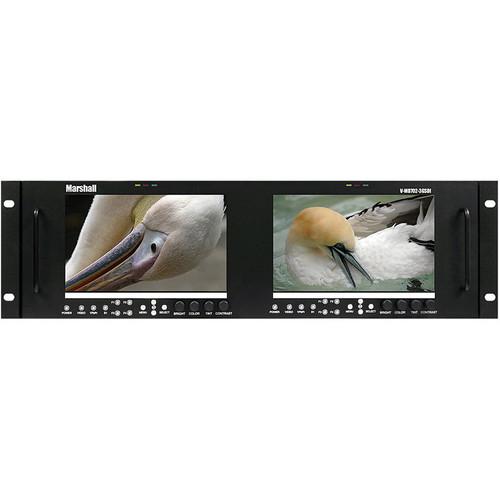
The Marshall Electronics V-MD702-3GSDI Dual Rack Mount LCD Monitor (7") comes with 2 MD-3GSDI-A modules and two 800 x 480 LED-backlit LCDs in a single configuration, thereby offering a flexible modular solution to system integration. Designed for 3G capabilities, it includes 3G-SDI (serial digital interface) inputs with loop through. A wide viewing angle of 140 x 100° ensures that you can view images clearly even from any corner of the room or when the display is mounted at a height. The LCD monitor offers a contrast ratio of 600:1 and a brightness rating of 450 cd/m². In addition to an aspect ratio of 16:10, the LCD monitor can automatically adapt to the input resolution of the incoming video signals.
With a pixel pitch of 0.1905 x 0.1905, the V-MD702-3GSDI LCD Monitor produces sharper images by displaying the finer elements of a picture. Equipped with RGB bias and gain function, the LCD monitor allows for fine tuning of color balance levels and facilitates color matching with other types of monitors. The False Color Filter function allows you to accurately set the camera exposure levels.
With the Pixel-to-Pixel mode, the V-MD702-3GSDI LCD Monitor allows you to display images in their native resolution by avoiding the monitor’s internal scaling function. The featured Freeze Function allows you bring the image to a standstill. You can analyze the individual color components of a picture via the Check Field function. The Monochrome mode allows you to view grayscale images by disabling all colors, and in blue, green, and red check field modes only the selected color will be displayed.
You can use the marker settings to control all on-screen markers, including the center marker, full screen markers, 16:9 markers, and 4:3 markers. Distortion that appears near crisp edges of objects due to video compression can be removed using the Mosquito filter. The ratio settings allows for switching between full screen, 4:3, and 16:3 aspect ratios. The Blue Only feature switches off red and green scan guns to produce an image made only from a blue scan gun. Equipped with a V-MD series rack that comes with a LAN port, the Dual Rack LCD Monitor can be monitored and its front panel can be accessed via a web browser.
The V-MD702-3GSDI Dual High Resolution LCD Monitor incorporates user-programmable F1, F2, F3, and F4 to assign various functions like ratio, check field, mosquito filter, false colors, freeze input, aspect markers, center marker, marker enable, pixel-to-pixel mode as required.
If you own a Marshall Electronics production monitors and have a user manual in electronic form,
you can upload it to this website using the link on the right side of the screen.
You can upload and download the manual for the Marshall Electronics V-MD702-3GSDI Dual Rack Mount V-MD702-3GSDI in the following formats:
*.pdf, *.doc, *.txt, *.jpg - Other formats are unfortunately not supported.
The user manual for the Marshall Electronics V-MD702-3GSDI Dual Rack Mount V-MD702-3GSDI can be downloaded in .pdf
format if it did not come with your new production monitors, although the seller is
required to supply one. It is also quite common that customers throw out
the user manual with the box, or put the CD away somewhere and then can’t find it.
That’s why we and other Marshall Electronics users keep a unique electronic library
for Marshall Electronics production monitorss,
where you can use our link to download the user manual for the Marshall Electronics V-MD702-3GSDI Dual Rack Mount V-MD702-3GSDI.
The user manual lists all of the functions of the Marshall Electronics V-MD702-3GSDI Dual Rack Mount V-MD702-3GSDI,
all the basic and advanced features and tells you how to use the production monitors.
The manual also provides troubleshooting for common problems. Even greater
detail is provided by the service manual, which is not typically shipped with the product,
but which can often be downloaded from Marshall Electronics service.
If you want to help expand our database, you can upload a link to this website
to download a user manual or service manual, ideally in .pdf format. These pages
are created by you – users of the Marshall Electronics V-MD702-3GSDI Dual Rack Mount V-MD702-3GSDI. User manuals are also
available on the Marshall Electronics website under Professional Video - Monitors - Production Monitors.
Question and answer discussion forum concerning user instructions and resolving problems with the Marshall Electronics V-MD702-3GSDI Dual Rack Mount V-MD702-3GSDI - no comments have been made yet - be the first to add a comment
I would like to download the manual for my Intel Xeon e5-2699 v3 Processor. Thank you!...AEE P60 manual - AEE P60 Hands-Free Police Camera P60 Posted by: Alcibiades Ballesteros 2025-11-10 21:25:00
Hello, I need your help to send me the user manual to AEE P60 Police recording equipment; because I forget the password to the interface software...keyboard pdf - Microsoft Natural Ergonomic Keyboard 4000 - USB B2M-00012 Posted by: Robert See 2025-10-29 16:12:12
Please send me a pdf manual for my Microsoft ergonomic keyboard 4000...How to export recorded files to my computer - Olympus VN-7200 Digital Voice Recorder V404130BU000 Posted by: Terrence Cato 2025-10-27 15:30:17


 Question and answer discussion forum concerning user instructions and resolving problems with the Marshall Electronics V-MD702-3GSDI Dual Rack Mount V-MD702-3GSDI - no comments have been made yet - be the first to add a comment