User manual Microsoft Wireless Desktop 3000 MFC-00001
Operating instructions and pdf manual for use - Microsoft Wireless Desktop 3000 MFC-00001 User manual, User manual Microsoft Wireless Desktop 3000 MFC-00001, Microsoft, Wireless, Desktop, 3000, MFC-00001, Video
User manual for Microsoft Wireless Desktop 3000 MFC-00001
Overall Rating: 4.5
90% of respondents would recommend this to a friend.
We recommend checking out our discussion threads on the Microsoft Wireless Desktop 3000 MFC-00001,
which address similar problems with connecting and setting up Mice & Keyboard Kits Microsoft.
User manual for the Microsoft Wireless Desktop 3000 MFC-00001
The user manual for the Microsoft Wireless Desktop 3000 MFC-00001 provides
necessary instructions for the proper use of the product Computers & Solutions - Computer Peripherals - Mice & Keyboard Kits.
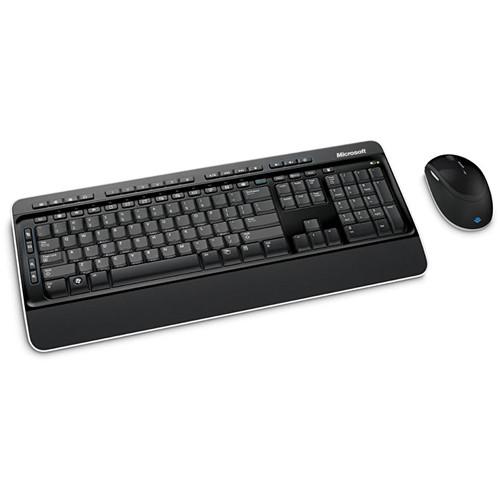
Sleek, compact, and affordable, the Microsoft Wireless Desktop 3000 is wireless keyboard and mouse combination that offers compatibility with Windows and Mac systems. Once you connect the included USB transceiver to a USB port on your computer, you can use the mouse and keyboard up to a range of thirty feet away, as they both run on the 2.4 GHz band. This keyboard offers a soft-touch palm rest and low-profile quiet-touch keys for comfort. The keyboard is also spill-resistant, including integrated water channels to capture liquid from accidental spills, so as to protect the keys. In terms of functions, the keyboard features the standard keyboard controls as well as media playback controls, a variety of hot keys, and customizable keyboard shortcut keys that access programs in the Windows Taskbar for Windows 7.
The included mouse uses BlueTrack technology to combine the power of optical tracking with the precision of laser, allowing for tracking on difficult surfaces. It features a handy 4-way scroll wheel, which allows you to swiftly scroll through documents and websites. It also features five programmable buttons, rubber side grips, and a magnifier button.
If you own a Microsoft mice & keyboard kits and have a user manual in electronic form,
you can upload it to this website using the link on the right side of the screen.
You can upload and download the manual for the Microsoft Wireless Desktop 3000 MFC-00001 in the following formats:
*.pdf, *.doc, *.txt, *.jpg - Other formats are unfortunately not supported.
Additional parameters of the Microsoft Wireless Desktop 3000 MFC-00001:
Interface
USB Compatible
Wireless
2.4 GHz
Range
Keyboard: 45' / 15 m typical Mouse: 30' / 9.14 m typical
RF range is affected by many factors, such as nearby metallic objects and relative positioning of the mouse and receiver
Keys
Additional Key Features: Taskbar Favorites for Windows 7
Media Keys: Mute, Volume -, Volume +, Play/Pause, Stop, Previous Track, and Next Track
Enhanced Function Keys: Help, Undo, Redo, New, Open, Close, Reply, Forward, Send, Spell, Save, and Print
Hot Keys: Mail, Web/Home, Calculator, Messenger, Music (Media Player), Flip 3-D, My Documents, My Pictures, Zoom In/Zoom Out, Show My Favorites, My Favorites 1, My Favorites 2, My Favorites 3, My Favorites 4, and My Favorites 5
Scroll Wheel
Yes
Ergonomic
No
System Requirements
Operating Systems: Windows 7, Vista, or XP (excluding Windows XP 64-bit) Mac OS X v10.2 - 10.5.7
Top-Line System Requirements: Requires a PC that meets the requirements for and has installed one of these operating systems: Microsoft Windows 7, Windows Vista, or Windows XP (excluding Windows XP 64-bit) 100 MB of available hard disk space CD drive Microsoft IntelliType Pro software version 7.0 and Microsoft IntelliPoint software version 7.0
For a Mac-Based Computer:
Mac OS X v10.2 - 10.5.7 30 MB of available hard disk space (Install 30 MB) CD drive Microsoft IntelliType Pro for Mac software version 7.0 and Microsoft IntelliPoint for Mac software version 7.0 Users of Mac OS X v10.2 must install enclosed IntelliType Pro/IntelliPoint software before connecting the hardware
Power Requirements
2x AA Batteries for the mouse 2x AA Batteries for the keyboard
Environmental Requirements
Storage Temperature: 40° to 140°F / -40° to 60 °C Humidity: 5% to 65% relative humidity (non-condensing)
Operating Temperature: 32°F to 104°F / 0° to 40°C Humidity: 5% to 80% relative humidity (non-condensing)
Dimensions (L x W x D)
Keyboard: 18.4 x 7.83 x 1.75" / 46.7 x 19.9 x 4.43 cm Mouse: 4.59 x 2.77 x 1.66" / 11.67 x 7.03 x 4.22 cm
Weight
Keyboard (including two AA batteries): 27.0 oz / 766 g Mouse (including two AA batteries): 5.36 oz / 152 g
The user manual for the Microsoft Wireless Desktop 3000 MFC-00001 can be downloaded in .pdf
format if it did not come with your new mice & keyboard kits, although the seller is
required to supply one. It is also quite common that customers throw out
the user manual with the box, or put the CD away somewhere and then can’t find it.
That’s why we and other Microsoft users keep a unique electronic library
for Microsoft mice & keyboard kitss,
where you can use our link to download the user manual for the Microsoft Wireless Desktop 3000 MFC-00001.
The user manual lists all of the functions of the Microsoft Wireless Desktop 3000 MFC-00001,
all the basic and advanced features and tells you how to use the mice & keyboard kits.
The manual also provides troubleshooting for common problems. Even greater
detail is provided by the service manual, which is not typically shipped with the product,
but which can often be downloaded from Microsoft service.
If you want to help expand our database, you can upload a link to this website
to download a user manual or service manual, ideally in .pdf format. These pages
are created by you – users of the Microsoft Wireless Desktop 3000 MFC-00001. User manuals are also
available on the Microsoft website under Computers & Solutions - Computer Peripherals - Mice & Keyboard Kits.
Question and answer discussion forum concerning user instructions and resolving problems with the Microsoft Wireless Desktop 3000 MFC-00001
I would like to download the manual for my Intel Xeon e5-2699 v3 Processor. Thank you!...AEE P60 manual - AEE P60 Hands-Free Police Camera P60 Posted by: Alcibiades Ballesteros 2025-11-10 21:25:00
Hello, I need your help to send me the user manual to AEE P60 Police recording equipment; because I forget the password to the interface software...keyboard pdf - Microsoft Natural Ergonomic Keyboard 4000 - USB B2M-00012 Posted by: Robert See 2025-10-29 16:12:12
Please send me a pdf manual for my Microsoft ergonomic keyboard 4000...How to export recorded files to my computer - Olympus VN-7200 Digital Voice Recorder V404130BU000 Posted by: Terrence Cato 2025-10-27 15:30:17


 Question and answer discussion forum concerning user instructions and resolving problems with the Microsoft Wireless Desktop 3000 MFC-00001