
PDF-MANUALS.com | User manual here!
User manual

User manual Pacific Image PowerSlide 5000 CCD Slides Scanner PS5000

Operating instructions and pdf manual for use - Pacific Image PowerSlide 5000 CCD Slides Scanner PS5000 User manual, User manual Pacific Image PowerSlide 5000 CCD Slides Scanner PS5000, Pacific, Image, PowerSlide, 5000, CCD, Slides, Scanner, PS5000


User manual for Pacific Image PowerSlide 5000 CCD Slides Scanner PS5000

Overall rating 4.0
Overall Rating: 4.0

80% of respondents would recommend this to a friend.
Pacific Image PowerSlide 5000 CCD Slides Scanner PS5000
  • Manufacturer: Pacific Image
  • Basic description and contents of package
  • Product classification: Photography - Scanners - Film Scanners
  • Safety instructions
  • Startup and operation of the film scanners
  • Tips for setting up your Pacific Image
  • Settings and expert assistance
  • Contact Pacific Image service
  • Troubleshooting
  • Warranty information
We recommend checking out our discussion threads on the Pacific Image PowerSlide 5000 CCD Slides Scanner PS5000, which address similar problems with connecting and setting up Film Scanners Pacific Image.


User manual for the Pacific Image PowerSlide 5000 CCD Slides Scanner PS5000

The user manual for the Pacific Image PowerSlide 5000 CCD Slides Scanner PS5000 provides necessary instructions for the proper use of the product Photography - Scanners - Film Scanners.

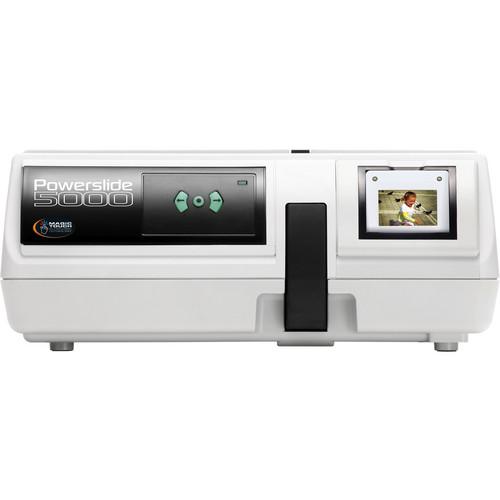
The Pacific Image PowerSlide 5000 CCD Slides Scanner is designed to convert large numbers of 35mm mounted slides into digital files that can be searched, processed, printed, or delivered electronically. With its impressive optical resolution of 5000dpi and 48-bit data conversion, the PowerSlide 5000 will deliver digital files that remain true to the original images.

The included slide magazine gives the scanner the ability to convert up to 50 mounted slides at a time. The Powerslide 5000 also includes software to streamline your digital workflow: Magic Touch for automated dust and scratch removal, and ImageFolio 4.5 for photo editing.
If you own a Pacific Image film scanners and have a user manual in electronic form, you can upload it to this website using the link on the right side of the screen.

You can upload and download the manual for the Pacific Image PowerSlide 5000 CCD Slides Scanner PS5000 in the following formats:
  • *.pdf, *.doc, *.txt, *.jpg - Other formats are unfortunately not supported.
Additional parameters of the Pacific Image PowerSlide 5000 CCD Slides Scanner PS5000:
Specifications
    Film Types 50mm x 50mm Mounted Slides
    Scan Quality
    Scan Sensor Linear Array Color CCD
    Optical Resolution 5000dpi x 5000dpi
    Scanning Area 37mm x 37mm (max)
    Color Depth 48-bit
    Data Distribution 48 bits per pixel (color mode)
    16 bits per pixel (grayscale mode)
    Dynamic Range 3.8 Dmax
    Focus System Auto Focus
    Performance
    Preview Speed Not specified by manufacturer
    Scan Speed Not specified by manufacturer
    Batch Scanning 2MB Buffer
    Automation Magic Touch Dust & Scratch Removal
    Connectivity
    Computer Interface USB 2.0 (USB 1.1 not supported)
    Windows System Requirements Windows XP SP2, Vista, 7 (32/64-bit)
    Intel Pentium 4 2 GHz or higher or AMD 2 GHz or higher
    1 GB RAM or more
    10 GB free hard disk space
    DVD-R drive for certain features
    Mac System Requirements Mac OS 10.5 or later
    Intel Core 2 Duo 1.8 GHz or greater
    1 GB RAM (2 GB recommended)
    10 GB free hard disk space
    Physical
    Light Source White and Infrared (IR) LED Array
    Power Requirements 100-240V AC, 50/60Hz
    Power Consumption 12VDC / 3A
    Dimensions (WxHxD) 11.4 x 4.9 x 11.8" (29 x 12.5 x 30 cm)
    Weight 5.5 lbs (2.5kg)
    Packaging Info
    Package Weight 10.0 lb
    Box Dimensions (LxWxH) 17.5 x 14.8 x 8.3"
    SilverFast 8.8 - History Feature
    SilverFast 8.5 - Selective Color Correction SCC
    SilverFast 8.5 - NegaFix
    The user manual for the Pacific Image PowerSlide 5000 CCD Slides Scanner PS5000 can be downloaded in .pdf format if it did not come with your new film scanners, although the seller is required to supply one. It is also quite common that customers throw out the user manual with the box, or put the CD away somewhere and then can’t find it. That’s why we and other Pacific Image users keep a unique electronic library for Pacific Image film scannerss, where you can use our link to download the user manual for the Pacific Image PowerSlide 5000 CCD Slides Scanner PS5000.

    The user manual lists all of the functions of the Pacific Image PowerSlide 5000 CCD Slides Scanner PS5000, all the basic and advanced features and tells you how to use the film scanners. The manual also provides troubleshooting for common problems. Even greater detail is provided by the service manual, which is not typically shipped with the product, but which can often be downloaded from Pacific Image service.

    If you want to help expand our database, you can upload a link to this website to download a user manual or service manual, ideally in .pdf format. These pages are created by you – users of the Pacific Image PowerSlide 5000 CCD Slides Scanner PS5000. User manuals are also available on the Pacific Image website under Photography - Scanners - Film Scanners.


    Discussion Question and answer discussion forum concerning user instructions and resolving problems with the Pacific Image PowerSlide 5000 CCD Slides Scanner PS5000

    Post new comment to Pacific Image PowerSlide 5000 CCD Slides Scanner PS5000

    Subject: Schematics for powerslide 5000
    Date: 15.07.2021 20:41:56Author: Rita Shoemaker
    Can you please direct me to the schematics for the powerslide 5000?
    Reply

    Post new comment/question/response regarding the Pacific Image PowerSlide 5000 CCD Slides Scanner PS5000

    Fields marked with * must be filled out.
    Your name *:
    E-mail :
    Subject *:
    Message text *:
    Enter the code *:
    (spam block)
    "manual"
    If you would like to receive a response to your comment, don’t forget to include your e-mail address. Your e-mail will not be displayed or otherwise used in any way.


    Can't find what you're looking for? Try Google Search!


    Current discussions
    Most recently discussed products:

    ls2208 - Motorola Symbol LS2208 Bar Code Reader LS2208-SR20007R-UR
    Posted by: Mike Lowe
    2025-12-01 18:37:07

    Here is the manual...
    Manual Request - HP Xeon E5-2699 v3 2.3 GHz 18-Core Processor J9P85AA
    Posted by: Andrew
    2025-11-19 04:02:52

    I would like to download the manual for my Intel Xeon e5-2699 v3 Processor. Thank you!...
    AEE P60 manual - AEE P60 Hands-Free Police Camera P60
    Posted by: Alcibiades Ballesteros
    2025-11-10 21:25:00

    Hello, I need your help to send me the user manual to AEE P60 Police recording equipment; because I forget the password to the interface software...
    keyboard pdf - Microsoft Natural Ergonomic Keyboard 4000 - USB B2M-00012
    Posted by: Robert See
    2025-10-29 16:12:12

    Please send me a pdf manual for my Microsoft ergonomic keyboard 4000...
    How to export recorded files to my computer - Olympus VN-7200 Digital Voice Recorder V404130BU000
    Posted by: Terrence Cato
    2025-10-27 15:30:17

    How do I export recorded files to my computer...

    Uploaded instruction manuals
    Upload a link to an instruction manual for a depicted product here:

    Link format "http://www.link2manual.com/manual.pdf"

    Enter the code: "manual"


    PDF-MANUALS.com - Community administered database of instructions for use and PDF User manual
    sitemap.txt alx
