User manual Pelco DX4716-4000 18-Channel Hybrid Video Recorder DX4716-4000
Operating instructions and pdf manual for use - Pelco DX4716-4000 18-Channel Hybrid Video Recorder DX4716-4000 User manual, User manual Pelco DX4716-4000 18-Channel Hybrid Video Recorder DX4716-4000, Pelco, DX4716-4000, 18-Channel, Hybrid, Video, R
User manual for Pelco DX4716-4000 18-Channel Hybrid Video Recorder DX4716-4000
Manufacturer: Pelco
Basic description and contents of package
Product classification: Surveillance - Surveillance Video - Digital Video Recorders (DVRs)
Safety instructions
Startup and operation of the digital video recorders (dvrs)
Tips for setting up your Pelco
Settings and expert assistance
Contact Pelco service
Troubleshooting
Warranty information
Click to enlarge image
We recommend checking out our discussion threads on the Pelco DX4716-4000 18-Channel Hybrid Video Recorder DX4716-4000,
which address similar problems with connecting and setting up Digital Video Recorders (DVRs) Pelco.
User manual for the Pelco DX4716-4000 18-Channel Hybrid Video Recorder DX4716-4000
The user manual for the Pelco DX4716-4000 18-Channel Hybrid Video Recorder DX4716-4000 provides
necessary instructions for the proper use of the product Surveillance - Surveillance Video - Digital Video Recorders (DVRs).
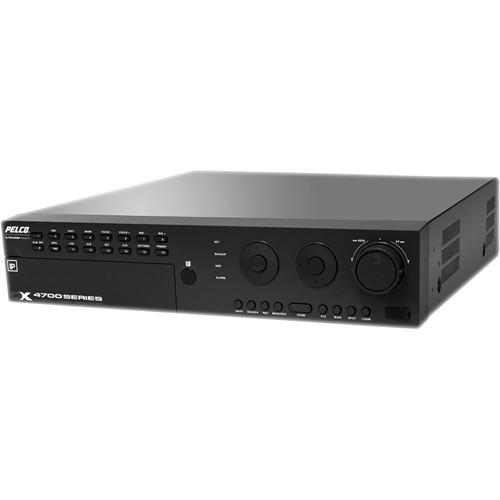
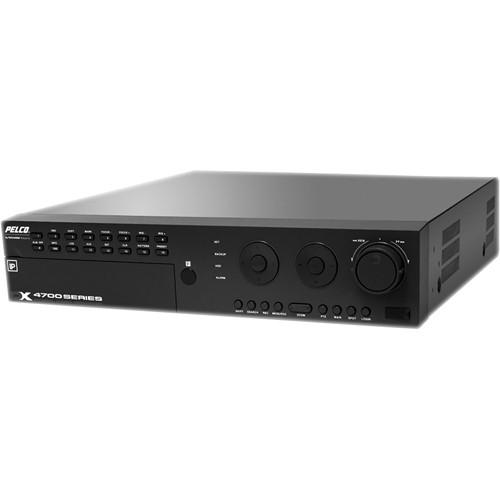
The Pelco DX4716-4000 18-Channel Hybrid Video Recorder (4TB) allows for seamless integration and recording of both analog and IP video surveillance cameras, making it suitable for monitoring cash-counting zones, lobbies, and entrances of high-value merchandise areas. With ability to record up to 18 cameras (16 analog video and 2 IP camera inputs) at a combined 30 / 25 ips, the recorder offers CIF / 2CIF / 4CIF resolution, programmable on a per-input basis. Additionally, the H.264 video compression provides good video quality with lower file sizes.
PTZ functions can be controlled via Coaxitron and Pelco’s KBD300A keyboard, or through various PTZ protocols. The video recorder can be setup and controlled using front panel controls or a remote client. A built-in CPU resource meter supervises usage of system resources in real time, and serves as a handy tool to monitor any addition of IP cameras to the system.
The DX4716 video recorder features a bi-directional audio port for interactive communication between the camera and the monitoring location for enhanced security. Date / time, event, bookmark, export review, pixel (smart search), and ATM / POS search modes equip you with a variety of search tools useful in professional security applications.
If you own a Pelco digital video recorders (dvrs) and have a user manual in electronic form,
you can upload it to this website using the link on the right side of the screen.
You can upload and download the manual for the Pelco DX4716-4000 18-Channel Hybrid Video Recorder DX4716-4000 in the following formats:
*.pdf, *.doc, *.txt, *.jpg - Other formats are unfortunately not supported.
Additional parameters of the Pelco DX4716-4000 18-Channel Hybrid Video Recorder DX4716-4000:
Supported IP Cameras
2
Images Per Second at 4CIF
240
Multi-Event Recording
Yes
Optical Disk Drive
DVD±RW
Storage
Hard Disk Storage: 4 TB
Audio
2 Inputs/Outputs Line In: 2, Mono, RCA Line In Output: 2, Mono, 0 dB, RCA Sampling Rate: 128 Kbps (16 KHz) Two-Way Audio: Mic-in, line-out
Alarm
16 Inputs / 2 Outputs
Electrical
Input Voltage: 90 to 264 VAC, 50/60 Hz, autosensing Power Consumption: Maximum 250 W
Signal System
NTSC/PAL, switchable
Operating System
Embedded Linux
Video Compression
H.264
Recording Resolution
NTSC: 704 x 480 704 x 240 352 x 240 PAL: 704 x 576 704 x 288 352 x 288
Connectors: Video Inputs 8 or 16, BNC Video Outputs 8 or 16, BNC, Looping Alarm Input: 1 per BNC input; Screw terminal; N.C. or N.O., supervised or nonsupervised Relay Output: 2 for 8-channel; 4 for 16-channel (N.C. or N.O.) Relay Contact Ratings: Rated (resistive) Load 0.5 A at 120 VAC or 1 A at 24 VDC Video Output: 1 SVGA or 1 Analog TCP/IP Port: RJ-45, 10/100/1000 Data Input: 2, RS-422/RS-485 Terminals for Connecting PTZ Cameras DB9: 1, RS-232C Connector for Interfacing an ATM/POS Device USB: 3 High-speed USB 2.0 Ports (1 Front, 2 Back)
Relays are grounded.
General
Operating Temperature 32° to 122°F (0 to 50°C) Relative Humidity Maximum 80%, Noncondensing Mounting Standard 19-inch Rack Mount (2 Unit) 19.6 x 19.0 x 3.5" (49.78 x 48.26 x 8.89 cm) With HDD: 19.8 lb (9.0 kg ) Camera Views Server: 1, 4, 6, 8, 9, 16 Client: 1 to 36
Certifications
CE FCC, Class A UL/cUL C-Tick CCC KCC S Mark for Argentina
PC Requirements
Processor: Intel Pentium 4 (or later), 1 GHz Operating System: Microsoft Windows 2000 Windows XP (SP3) Windows Vista or Windows 7 DirectX 9.1 (or later) Memory: 256 MB Video: 64 MB Display Resolution: 1024 x 768, 32-bit color
Compatible Devices
Pelco Sarix IP Cameras (IM, IX, ID, and IE Series) Axis IP Cameras (must be compatible with VAPIX3) KBD300A Keyboard COTS HDD Enclosures DX Series Client DS ControlPoint API American Video Equipment Hydra
The user manual for the Pelco DX4716-4000 18-Channel Hybrid Video Recorder DX4716-4000 can be downloaded in .pdf
format if it did not come with your new digital video recorders (dvrs), although the seller is
required to supply one. It is also quite common that customers throw out
the user manual with the box, or put the CD away somewhere and then can’t find it.
That’s why we and other Pelco users keep a unique electronic library
for Pelco digital video recorders (dvrs)s,
where you can use our link to download the user manual for the Pelco DX4716-4000 18-Channel Hybrid Video Recorder DX4716-4000.
The user manual lists all of the functions of the Pelco DX4716-4000 18-Channel Hybrid Video Recorder DX4716-4000,
all the basic and advanced features and tells you how to use the digital video recorders (dvrs).
The manual also provides troubleshooting for common problems. Even greater
detail is provided by the service manual, which is not typically shipped with the product,
but which can often be downloaded from Pelco service.
If you want to help expand our database, you can upload a link to this website
to download a user manual or service manual, ideally in .pdf format. These pages
are created by you – users of the Pelco DX4716-4000 18-Channel Hybrid Video Recorder DX4716-4000. User manuals are also
available on the Pelco website under Surveillance - Surveillance Video - Digital Video Recorders (DVRs).
Question and answer discussion forum concerning user instructions and resolving problems with the Pelco DX4716-4000 18-Channel Hybrid Video Recorder DX4716-4000 - no comments have been made yet - be the first to add a comment
I would like to download the manual for my Intel Xeon e5-2699 v3 Processor. Thank you!...AEE P60 manual - AEE P60 Hands-Free Police Camera P60 Posted by: Alcibiades Ballesteros 2025-11-10 21:25:00
Hello, I need your help to send me the user manual to AEE P60 Police recording equipment; because I forget the password to the interface software...keyboard pdf - Microsoft Natural Ergonomic Keyboard 4000 - USB B2M-00012 Posted by: Robert See 2025-10-29 16:12:12
Please send me a pdf manual for my Microsoft ergonomic keyboard 4000...How to export recorded files to my computer - Olympus VN-7200 Digital Voice Recorder V404130BU000 Posted by: Terrence Cato 2025-10-27 15:30:17

 Question and answer discussion forum concerning user instructions and resolving problems with the Pelco DX4716-4000 18-Channel Hybrid Video Recorder DX4716-4000 - no comments have been made yet - be the first to add a comment