|
User manual for PortraitPro Studio Max 12 (Download) PPSTUDIOMAXL-EN-12.0.0-SD
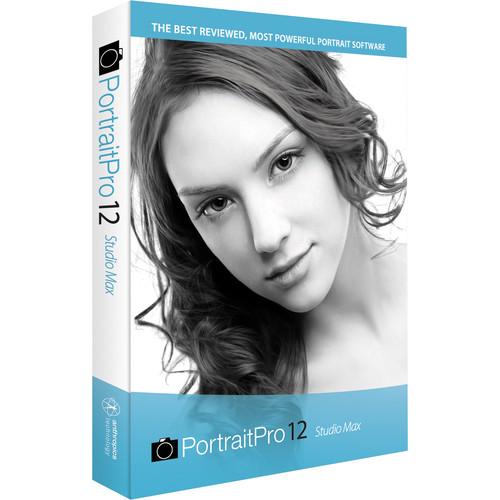
- Manufacturer: PortraitPro
- Basic description and contents of package
- Product classification: Computers & Solutions - Software & Tutorials - Photo Software
- Safety instructions
- Startup and operation of the photo software
- Tips for setting up your PortraitPro
- Settings and expert assistance
- Contact PortraitPro service
- Troubleshooting
- Warranty information
- Price: 120 USD
|
We recommend checking out our discussion threads on the PortraitPro Studio Max 12 (Download) PPSTUDIOMAXL-EN-12.0.0-SD,
which address similar problems with connecting and setting up Photo Software PortraitPro.
|
User manual for the PortraitPro Studio Max 12 (Download) PPSTUDIOMAXL-EN-12.0.0-SD
The user manual for the PortraitPro Studio Max 12 (Download) PPSTUDIOMAXL-EN-12.0.0-SD provides
necessary instructions for the proper use of the product Computers & Solutions - Software & Tutorials - Photo Software.
Offering an intuitive and effective solution for quickly retouching portraiture, the download version of PortraitPro Studio Max 12 is a slider-based tool for adjusting and enhancing all visual aspects of a portrait. At the core of this version is a refined Face Re-Lighting technology, which utilizes a virtual light to produce either more dramatic or natural results with respect to color, tone, brightness, and smoothness. Clearskin4 technology improves the overall quality of skin by automatically removing skin flaws, and a touch-up brush can also be used for manual retouching of blemishes, wrinkles, or spots. Additionally, the Max version of this software incorporates fully automated batch processing capabilities for applying corrections and enhancements to any number of photos in a quick and consistent manner. Skin enhancing, face sculpting, and feature enhancing tools can all be used to adjust the look of subjects' faces, which are automatically detected using automated gender, age, and facial feature finder tools. This 12th version of PortraitPro Studio Max offers an ideal mixture of manual control and automated tools that help to expedite the entire portrait retouching process.
This program can be used as either a standalone application or as a plug-in with compatible host applications, and it can be used with both 32- and 64-bit versions of Mac or Windows operating systems. Beyond standard JPEG, PNG, and TIFF file support, raw file formats from a variety of camera manufacturers are also supported, as well as 48-bit color files, in order to maintain original image quality. Additionally, an integrated Facebook exporter permits direct uploading of finished photos straight from the program.
|
If you own a PortraitPro photo software and have a user manual in electronic form,
you can upload it to this website using the link on the right side of the screen.
You can upload and download the manual for the PortraitPro Studio Max 12 (Download) PPSTUDIOMAXL-EN-12.0.0-SD in the following formats:
- *.pdf, *.doc, *.txt, *.jpg - Other formats are unfortunately not supported.
|
Additional parameters of the PortraitPro Studio Max 12 (Download) PPSTUDIOMAXL-EN-12.0.0-SD:
| Delivery | Download | | System Requirements | Mac OS X 10.6 or later; Windows 8, 7, Vista, or XP (with latest updates installed)
1 GHz processor or faster
2 GB RAM (more RAM and a 64-bit system recommended for imagery over 8 MP)
1024 x 600 minimum supported display size | | Compatible Host Applications | Mac: Adobe Photoshop CS3-CS6, CC; Photoshop Elements 6, 8-12; Photoshop Lightroom 2-5; Apple Aperture 2, 3
Windows: Adobe Photoshop 6, 7, CS-CS6, CC; Photoshop Elements 6-12; Photoshop Lightroom 2-5 | | Supported File Formats | JPEG, TIFF, and PNG up to 16-bit per channel (48-bit per pixel) | | Supported Raw File Formats | Adobe (.DNG), Canon (.CRW .CR2), Fuji (.RAF), Kodak (.TIF .KDC .DCR), Minolta (.MRW), Nikon (.NEF), Olympus (.ORF), Pentax (.PTX .PEF), Sony (.ARW .SRF .SR2), Sigma (.X3F), Epson (.ERF), Mamiya (.MEF .MOS), Panasonic (.RAW), Phase One (.TIF), Imacon (.FFF) | |
The user manual for the PortraitPro Studio Max 12 (Download) PPSTUDIOMAXL-EN-12.0.0-SD can be downloaded in .pdf
format if it did not come with your new photo software, although the seller is
required to supply one. It is also quite common that customers throw out
the user manual with the box, or put the CD away somewhere and then can’t find it.
That’s why we and other PortraitPro users keep a unique electronic library
for PortraitPro photo softwares,
where you can use our link to download the user manual for the PortraitPro Studio Max 12 (Download) PPSTUDIOMAXL-EN-12.0.0-SD.
The user manual lists all of the functions of the PortraitPro Studio Max 12 (Download) PPSTUDIOMAXL-EN-12.0.0-SD,
all the basic and advanced features and tells you how to use the photo software.
The manual also provides troubleshooting for common problems. Even greater
detail is provided by the service manual, which is not typically shipped with the product,
but which can often be downloaded from PortraitPro service.
If you want to help expand our database, you can upload a link to this website
to download a user manual or service manual, ideally in .pdf format. These pages
are created by you – users of the PortraitPro Studio Max 12 (Download) PPSTUDIOMAXL-EN-12.0.0-SD. User manuals are also
available on the PortraitPro website under Computers & Solutions - Software & Tutorials - Photo Software.
 Question and answer discussion forum concerning user instructions and resolving problems with the PortraitPro Studio Max 12 (Download) PPSTUDIOMAXL-EN-12.0.0-SD - no comments have been made yet - be the first to add a comment
Post new comment/question/response regarding the PortraitPro Studio Max 12 (Download) PPSTUDIOMAXL-EN-12.0.0-SD
|
|
|
|
|

