|
User manual for TV One Edge Blender C2-2450A
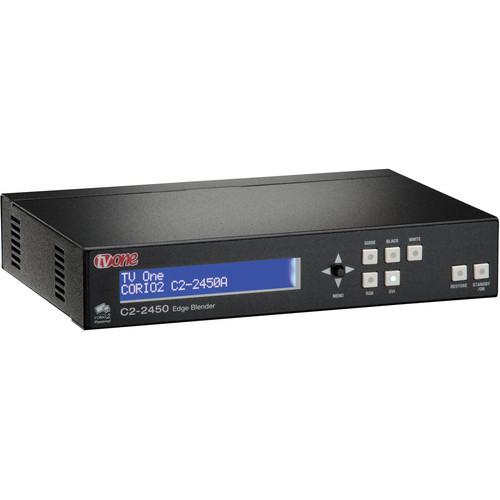
- Manufacturer: TV One
- Basic description and contents of package
- Product classification: Professional Video - Signal Processing & Distribution - Video & Audio Processing
- Safety instructions
- Startup and operation of the video & audio processing
- Tips for setting up your TV One
- Settings and expert assistance
- Contact TV One service
- Troubleshooting
- Warranty information
|
We recommend checking out our discussion threads on the TV One Edge Blender C2-2450A,
which address similar problems with connecting and setting up Video & Audio Processing TV One.
|
User manual for the TV One Edge Blender C2-2450A
The user manual for the TV One Edge Blender C2-2450A provides
necessary instructions for the proper use of the product Professional Video - Signal Processing & Distribution - Video & Audio Processing.
The TV One Edge Blender allows you to align multiple projectors in a pixel perfect way for avoiding either a gap between the images or a double bright seam. With pixel-accurate scaling, the edge blender is a smart solution for overlapping 2 or more images to create a seamless transition. It overlaps the images by a significant amount, and modifies the pixels in the region to make the overlap as invisible as possible.
Featuring Automatic Incomming Resolution Detection, the Edge Blender supports a wide range of sources by offering compatibility with analog resolutions up to 2048 x 2048, DVI up to 1920 x 1200, and HDTV up to 1080p. It uses temporal and diagonal interpolation techniques and uses 4:4:4 full bandwidth sampling to further enhance the final output. Via gamma correction, the Edge Blender compensates for the irregularities in brightness of different images to create an optimum blend. It features adjustments for various video signal parameters for making fine adjustments to the picture quality. A variable image zoom allows you to inspect the image very minutely with 10x zoom or get an overview via shrinking of the image to as low as 10%. It provides black and white test outputs for checking the display quality.
With 10 user defined presets, the Edge Blender allows you to customize settings for various applications. Featuring a non-volatile memory, it stores the settings used, thus saves setup time for your next use. In addition, even if the power is turned off, your settings are not lost. Windows control panel software allows you to control your Edge Blender using your PC. You can also control the unit via front panel push buttons, IR, RS-232 signaling, and over an IP network. It also includes a front panel LCD for quickly making the necessary change in settings.
|
If you own a TV One video & audio processing and have a user manual in electronic form,
you can upload it to this website using the link on the right side of the screen.
You can upload and download the manual for the TV One Edge Blender C2-2450A in the following formats:
- *.pdf, *.doc, *.txt, *.jpg - Other formats are unfortunately not supported.
|
Additional parameters of the TV One Edge Blender C2-2450A:
| Signal Type | 1 x DVI-D via DVI-I connector / 1 x analog via HD-15 female | | Formats | RGBHV, RGBS, RGsB, YPbPr | | Sync | TTL Level, 10Kohm, pos or neg | | Termination | 75 ohm | | R-G-B Level Range | 0.5 to 2 Vpp | | Scan Rate Detection | Automatic
PC Resolutions
DVI: up to 1920x1200 60Hz
Analog: up to 2048x2048
HDTV Resolutions: Any up to 1080p/60 | | Maximum Horizontal Scan Rate | 150 KHz | | Computer Compatibility | PC, Macintosh, Workstations | | Signal Type | 1 x DVI-I via DVI-I connector / 1 x analog via HD-15 connector | | Formats | RGBHV, RGBS, RGsB, YPbPr | | Resolutions | Analog signals: PC to 2048x2048,HD to 1080p/60
DVI signals: PC to 1920 x 1200,HD to 1080p/60 | | R-G-B Level | 0.7 Vpp | | Vertical Refresh Rate | Any to 250 Hz | | Size and Position | Automatic via autoset or manual | | Image Size | User-definable presets | | Image Freeze | 1 video frame | | Settings Memory | Non-volatile | | Zoom Range | Variable to 10x Zoom | | Shrink Range | Variable to 10% | | Image Mirroring | Horizontal and/or vertical | | Horizontal Filtering | Full digital | | Conversion Technology Proprietary | CORIO2 | | Frame Rate Conversion | Temporal | | Color Resolution | 24-bit (16.8 million colors) | | Sampling Rate | 162 MHz | | Digital Sampling | 24-bit, 4:4:4 format | | Firmware Memory | flash, upgradeable via RS-232 | | Local Control | Via front panel buttons & OSD | | Interface | RS-232: via D9 female connector
IP: via RJ45 connector | | IR Remote | Optional IRC-5 remote unit | | Input Expansion Control | Via D-15 options connector | | Regulatory Compliance | Main Units: FCC, CE, RoHS
Power Supplies: UL, CUL, CE, PSE, GS, RoHS | | Operating Temperature | 32 to 122° F (0 to 50° C) | | Operating Humidity | 10 to 85%, non-condensing | | Storage Temperature | 14 to +158° F (-10 to 70° C) | | Storage Humidity | 10 to 85%, non-condensing | | Power Supply | 12 V DC @ 1 A | | Dimensions (HxWxD) | 1.63 x 8.6 x 5.9" (41.5 x 218 x 150 mm) | | Weight | 2.90 lb (1.32 kg) | | Package Weight | 1.0 lb | | Box Dimensions (LxWxH) | 13.75 x 9.5 x 6.5" | |
The user manual for the TV One Edge Blender C2-2450A can be downloaded in .pdf
format if it did not come with your new video & audio processing, although the seller is
required to supply one. It is also quite common that customers throw out
the user manual with the box, or put the CD away somewhere and then can’t find it.
That’s why we and other TV One users keep a unique electronic library
for TV One video & audio processings,
where you can use our link to download the user manual for the TV One Edge Blender C2-2450A.
The user manual lists all of the functions of the TV One Edge Blender C2-2450A,
all the basic and advanced features and tells you how to use the video & audio processing.
The manual also provides troubleshooting for common problems. Even greater
detail is provided by the service manual, which is not typically shipped with the product,
but which can often be downloaded from TV One service.
If you want to help expand our database, you can upload a link to this website
to download a user manual or service manual, ideally in .pdf format. These pages
are created by you – users of the TV One Edge Blender C2-2450A. User manuals are also
available on the TV One website under Professional Video - Signal Processing & Distribution - Video & Audio Processing.
 Question and answer discussion forum concerning user instructions and resolving problems with the TV One Edge Blender C2-2450A - no comments have been made yet - be the first to add a comment
Post new comment/question/response regarding the TV One Edge Blender C2-2450A
|
|
|
|
|
